

How to Create Table Of Contents in RELAYTO
How to create ToC guide and video tutorials
Creating a Table of Contents Let’s get started We've put together a RELAYTO/ document about how to create Table of Content for your document in few simple steps.

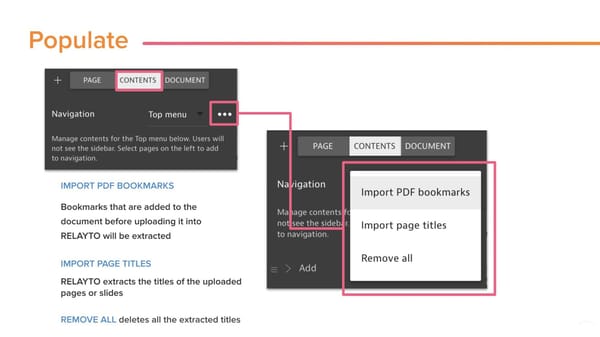
Present Navigation: Choose how the table of contents will look from the following options SIDEBAR - OUTLINE: Table of contents will be text-based TOP MENU: SIDEBAR - THUMBNAILS: Text in the table of contents Table of contents will be will be transformed into a image-based top menu. Nestled items will become sub-items in the menu
SIDEBAR - OUTLINE Table of Contents view options TOP MENU SIDEBAR - THUMBNAILS
Organize Organize Pages: Remove pages of the document by Add pages to the table of selecting the contents by selecting the delete icon bookmark icon Rearrange pages by dragging thumbnails of pages into place
Table of Contents from page titles How to video

Table of Contents from PDF Bookmarks How to video

Manually Creating Table of Content How to video
Organize Titles order: Single Nesting
Organize Titles order: Multiple Nesting
About this PDF document
- Published by RELAYTO Content Experience
- Published on
About RELAYTO Content Experience
The fastest way to build digital experiences. We empower businesses to convert PDFs, presentations and other content into interactive experiences & webpages with instant branding, analytics & more