

📊 Enhanced Content Analytics
January 30, 2026
- Accurate Metrics – Analytics icons and numbers now refresh correctly and consistently within a day.
- Full Page Previews – See the clear page previews and analyze which one is the most popular among your content viewers.
- Usable Interactivity Charts – Interactive elements are easier to read, hover behavior is consistent, and items without data are handled clearly.
- Clean Navigation – Page names now appear instead of raw URLs.
- CSV Export Improvements – Full datasets included, duplicates removed, missing page numbers restored, and date formats corrected.
- Workspace User Exclusion – New toggle allows excluding workspace users from analytics for more relevant insights.
Why It Matters:
- Clear Insights – Analytics and dashboard content cards now provide accurate, trustworthy data.
- Easy Analysis – Charts, page previews, and exports are easier to read and use.
- Streamlined Workflow – Exclude workspace users and get cleaner data for smarter decision-making.
🔖 Content Bookmarks in Studio – Improved Visibility
January 27, 2026
- Bookmark Option – Fully accessible for all content views in Studio.
Why It Matters:
- Save Time – Quickly navigate to key content sections.
- Streamlined Workflow – Bookmarks are reliable and consistent.
📥 Downloads – Reliable & Accurate
January 22, 2026
- Correct File Downloads – the most recent PDF files now save properly for all your experiences.
- Download directly from your dashboard – now it works smoothly without errors.
Why It Matters:
- Work Efficiently – Files are ready to use instantly.
- No Surprises – Downloads behave exactly as expected.
🧭 Navigation & Workspace Flow – Clear and Predictable
January 21, 2026
- Persistent Navigation – Horizontal hub naigation is improved for different screen sizes.
- Smooth Workspace Transitions – Switching between personal and company workspaces or signing in redirects correctly every time.
Why It Matters:
- Easier Navigation – Move through hubs without confusion.
- Reliable Access – Always reach the right workspace or dashboard effortlessly.
📁 Hub Management & Content Stability
January 20, 2026
- Reliable Hub Operations – Hub actions are improved to avoid errors during renaming or while working with large hubs.
- Consistent Content Display – Pinned items stay at the top and custom-sorted content remains stable during navigation.
Why It Matters:
- Work Confidently – Hubs behave predictably, so you can focus on content, not fixes.
- Fewer Interruptions – Content order and visibility are now rock-solid.
🎬 Studio & Content Editing – Smoother, More Reliable
January 19, 2026
- Faster & More Stable Studio – Studio now opens reliably across different content views and document types.
- Reliable Metadata Updates – Content titles, descriptions, and AI edits now save consistently.
- Consistent Interactivity – “On load” animations and interactive elements display smoothly while navigating slides.
Why It Matters:
- Work Without Interruptions – Studio and editing tools behave predictably every time.
- Full Control – All editing options are accessible and reliable.
- Polished Content – Animations, metadata, and interactive elements now work seamlessly.
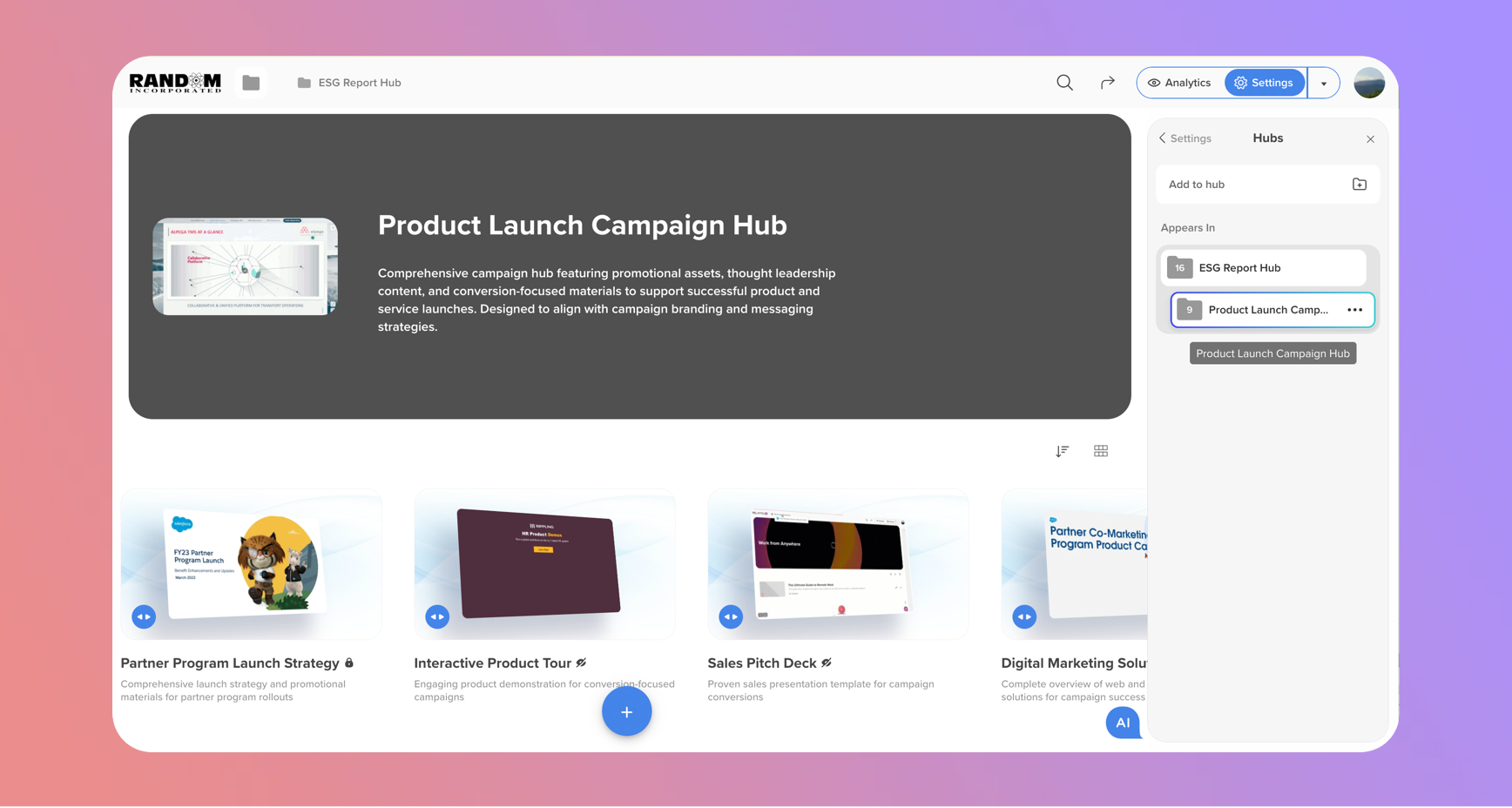
🌐 Connected Hubs – Full Hierarchy View
January 16, 2026
- See Hub Relationships – Discover where your hub or content is used across other hubs.
- Full Tree Hierarchy – Explore the complete structure and easily access any element.
- Quick Access and content removal – Available directly via content or hub settings.
Why It Matters:
- Better Context – Understand how content fits across your workspace.
- Easy Navigation – Jump to related hubs and elements in one click.
- Streamlined Management – Manage interconnected content efficiently.
🤖 AI Chat & AI Agent – Smoother, Smarter, More Reliable
January 15, 2026
- Clearer AI Actions – Each hub update via AI Agent now appears smoothly on your screen and in real time.
- Accurate Content Display – Recently added hub content shows correctly in a new AI responses.
Why It Matters:
- Easier Interaction – AI responses are clear and smart.
- More Reliable – No missing content.
- Smoother Experience – Chat feels polished and consistent across desktop and mobile.
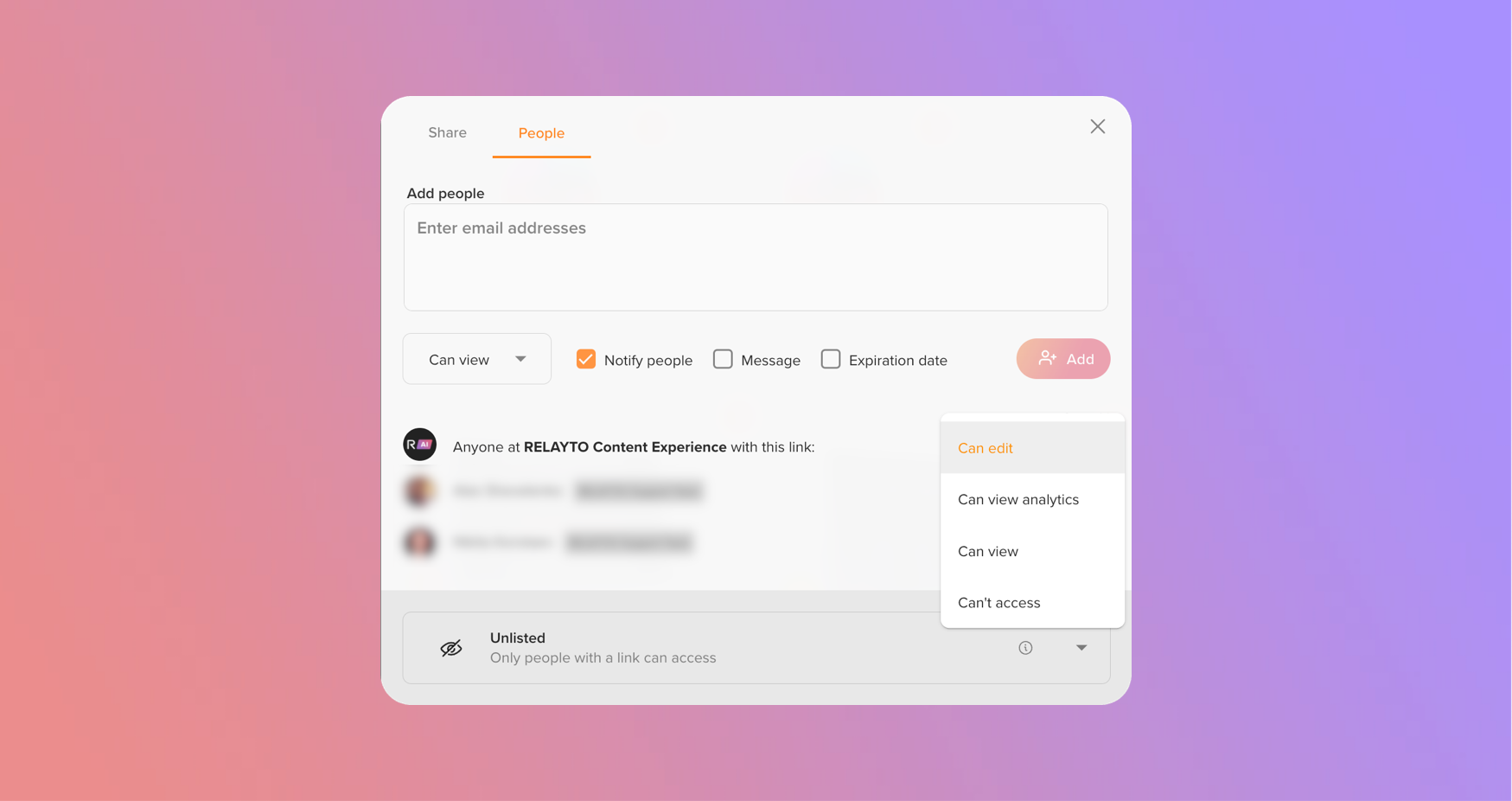
🔑 Clearer “Anyone at the Company” Permissions
January 14, 2026
- Simplified Setup – Easily apply permissions for all workspace users at once, without adding them individually.
- Predictable Behavior – The setting now works consistently and is easier to understand.
Why It Matters:
- Saves Time – Manage large teams more efficiently.
- Easier Collaboration – All users get access as intended, without extra steps.
🛠️ Enhanced Content Reordering
January 13, 2026
- Improved Control – Content order in custom-order hubs now updates more reliably and stays consistent.
🛠️ Improved PDF Updates You Can Trust
January 12, 2026
Updating PDFs is now smoother, more reliable, and predictable – no more mismatched pages or broken navigation.
- Accurate Page Matching – Pages are aligned correctly when replacing a PDF.
- Cleaner Content Reuse – Existing content carries over seamlessly between versions.
- Reliable Navigation – Links and structure stay in sync automatically.
Why It Matters:
- Save Time – Less manual cleanup after updates.
- Reduce Errors – PDFs behave exactly as expected.
- Hassle-Free Updates – Everything works automatically; no action needed on your side.
🛠️ Interactive Links Fix
January 9, 2026
- Improved Widgets Behavior for Links – Resolved an issue where interactive links could open a blank popup widget on certain devices.
Why It Matters:
- More Reliable Experience – Interactive links now open consistently as expected.
- Smoother Viewing – No interruptions when navigating content.
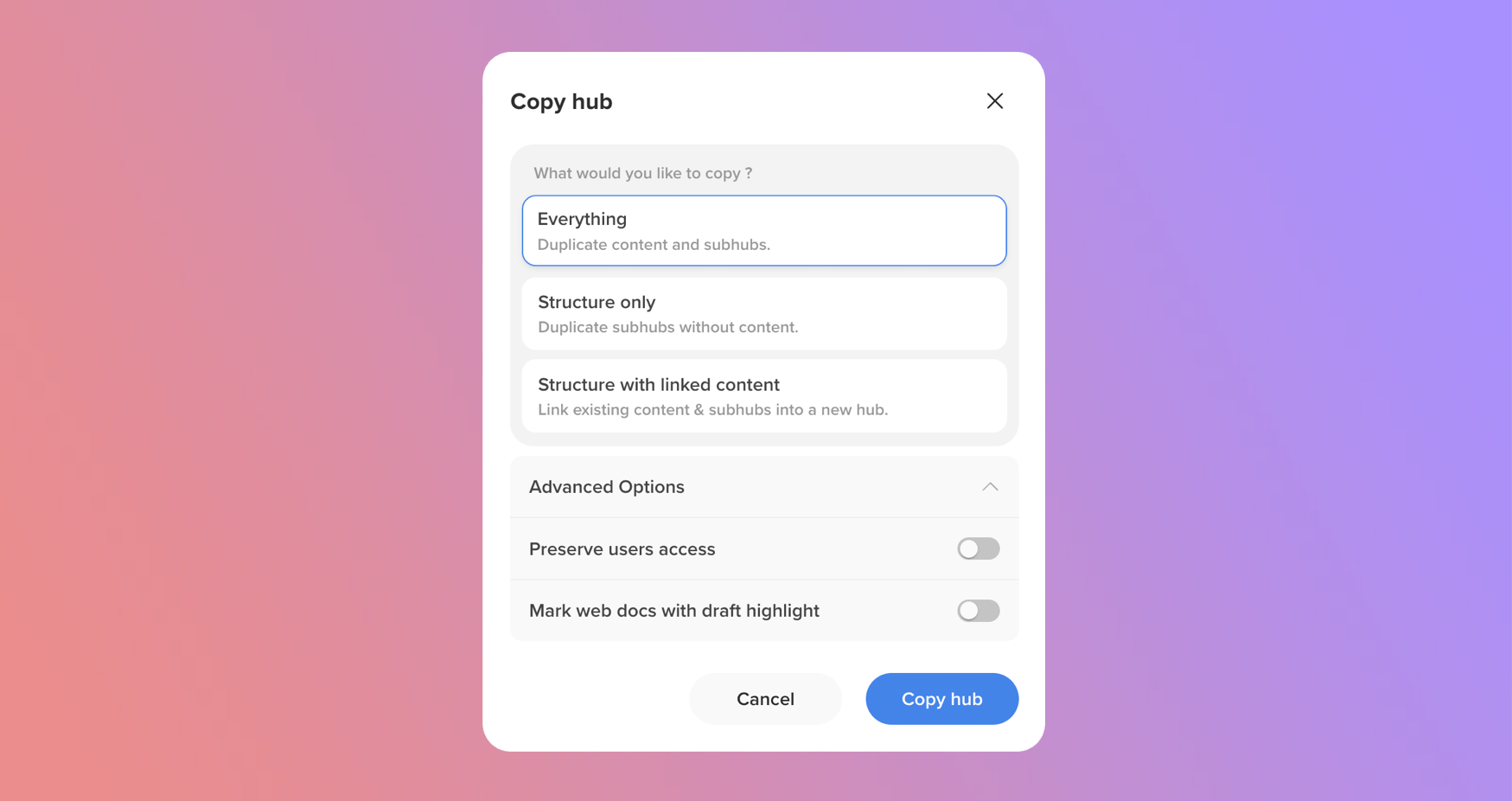
🧬 Hub Cloning – Advanced Options Are Live!
January 8, 2026
We’ve upgraded hub cloning with powerful new controls – giving you more flexibility and confidence when duplicating hubs.
- Preserve User Access – Keep existing user permissions when cloning a hub, so your team retains the same access instantly—no extra setup needed.
- Draft Highlight for Web Docs – Automatically mark cloned web documents as drafts, so it’s always clear which content is still in progress.
Why It Matters:
- Save Time – Skip manual permission reconfiguration after cloning.
- Reduce Mistakes – Draft indicators help prevent unfinished content from being treated as final.
- Improve Team Collaboration – Access stays consistent across cloned hubs.
- Publish with Confidence – Clear visual cues make content readiness obvious.
✨ These enhancements make hub cloning smarter, safer, and more aligned with real team workflows.
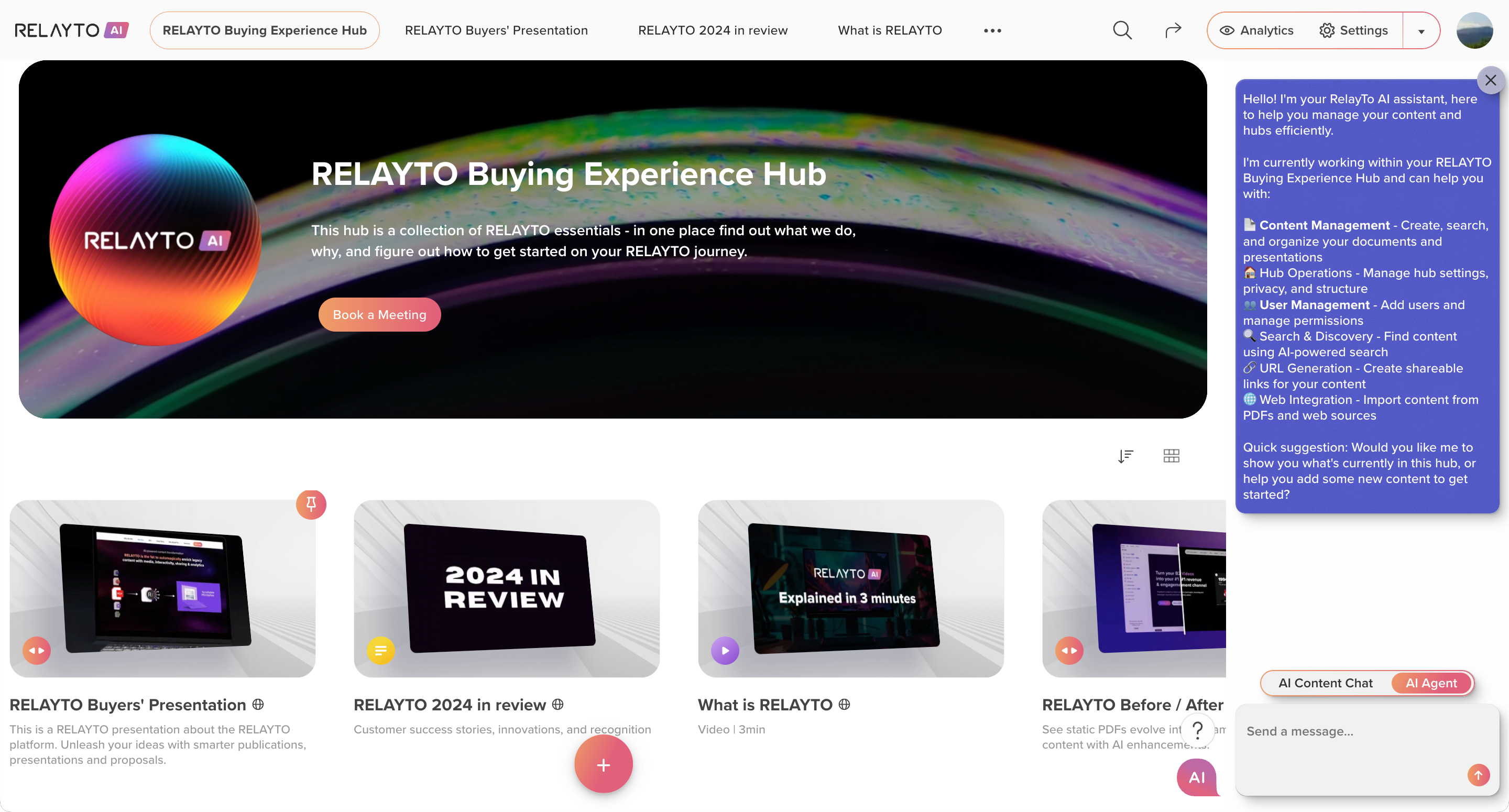
🤖 Meet AI Agent – Your Smart Hub Assistant
January 7, 2026
- Manage Hubs & Content Instantly – Add, remove, search, and organize your documents and presentations with simple requests—no more digging through settings.
- Effortless Hub Organization – Create new hubs, update settings, and structure your hub in seconds.
- Team Management Made Simple – Control permissions, and manage access levels in one click.
- Instantly upload interactive content to your hubs – easily ask AI Agent to upload your PDFs directly to the hub and transform them into interactive content.
- AI-Powered Search & Discovery – Find exactly what you need in your hubs, faster than ever.
Why This Changes the Game:
- Save Time – What used to take minutes now happens in seconds.
- Simplify Workflows – Fewer clicks, less manual effort, smoother organization.
- Stay Organized – Keep content and hubs perfectly structured, automatically.
🎨 Frontent Upgrade – Smoother, Brighter, Faster Content Experience
January 5, 2026
- Faster Interactions – Pages load quicker, scrolling feels seamless, and updates appear without delays.
- Polished Content Views – Layouts are cleaner, text is more readable, colors pop, and every state is smoother and more consistent. Accessibility improvements make content easier to see and navigate for everyone.
- Reliable Across Modern Devices – Works beautifully on desktops, laptops, and mobile devices with the latest browsers.
Why It Matters:
- Cleaner, More Readable Design – Better visuals make work more enjoyable.
- Accessible for Everyone – Navigation and readability improvements help all users.
🚀 Platform Infrastructure Upgrade – Live!
January 3, 2026
- Stronger, Safer, Smarter – We’ve refreshed the core platform to keep your data secure, your workflows reliable, and your experience seamless.
- Future-Ready Architecture – Built on modern standards to ensure the platform stays fast and stable.
- Smooth Performance, Fewer Interruptions – Internal improvements mean fewer errors and more predictable behavior for your team.
Why You’ll Love It:
- Rock-Solid Security – Your data is better protected than ever.
- Future-Proof – Built to stay compatible with new features, updates, and integrations.
- No Action Needed – Everything happens automatically in the background.