

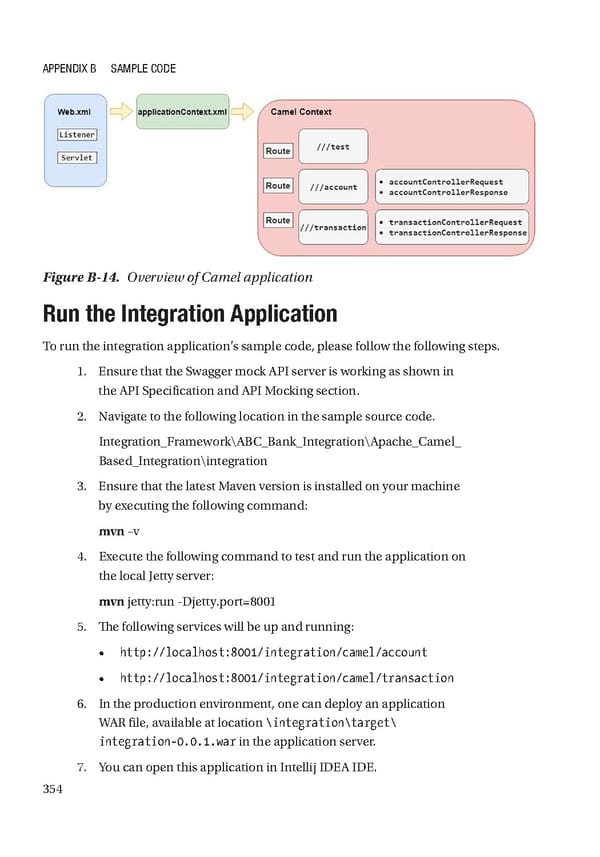
Appendix B SAmple Code Figure B-14. Overview of Camel application Run the Integration Application To run the integration application’s sample code, please follow the following steps. 1. Ensure that the Swagger mock API server is working as shown in the API Specification and API Mocking section. 2. Navigate to the following location in the sample source code. Integration_Framework\ABC_Bank_Integration\Apache_Camel_ Based_Integration\integration 3. Ensure that the latest Maven version is installed on your machine by executing the following command: mvn –v 4. Execute the following command to test and run the application on the local Jetty server: mvn jetty:run -Djetty.port=8001 5. The following services will be up and running: • http://localhost:8001/integration/camel/account • http://localhost:8001/integration/camel/transaction 6. In the production environment, one can deploy an application WAR file, available at location \integration\target\ integration-0.0.1.war in the application server. 7. You can open this application in Intellij IDEA IDE. 354
 Building Digital Experience Platforms Page 363 Page 365