

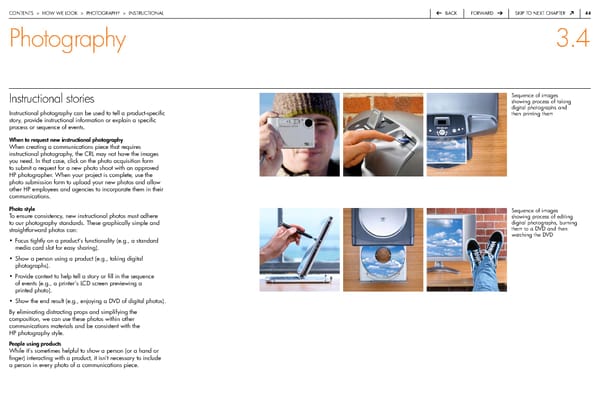
contentS > how we Look > photoGraphy > inStructionaL back forward Skip to next chapter 44 Photography 3.4 Instructional stories Sequence of images showing process of taking digital photographs and instructional photography can be used to tell a product-specific then printing them story, provide instructional information or explain a specific process or sequence of events. When to request new instructional photography when creating a communications piece that requires instructional photography, the crL may not have the images you need. in that case, click on the photo acquisition form to submit a request for a new photo shoot with an approved hp photographer. when your project is complete, use the photo submission form to upload your new photos and allow other hp employees and agencies to incorporate them in their communications. Photo style Sequence of images to ensure consistency, new instructional photos must adhere showing process of editing to our photography standards. these graphically simple and digital photographs, burning straightforward photos can: them to a dVd and then watching the dVd • focus tightly on a product’s functionality (e.g., a standard media card slot for easy sharing). • Show a person using a product (e.g., taking digital photographs). • provide context to help tell a story or fill in the sequence of events (e.g., a printer’s Lcd screen previewing a printed photo). • Show the end result (e.g., enjoying a dVd of digital photos). by eliminating distracting props and simplifying the composition, we can use these photos within other communications materials and be consistent with the hp photography style. People using products while it’s sometimes helpful to show a person (or a hand or finger) interacting with a product, it isn’t necessary to include a person in every photo of a communications piece.
 HP Brand Book Page 44 Page 46