

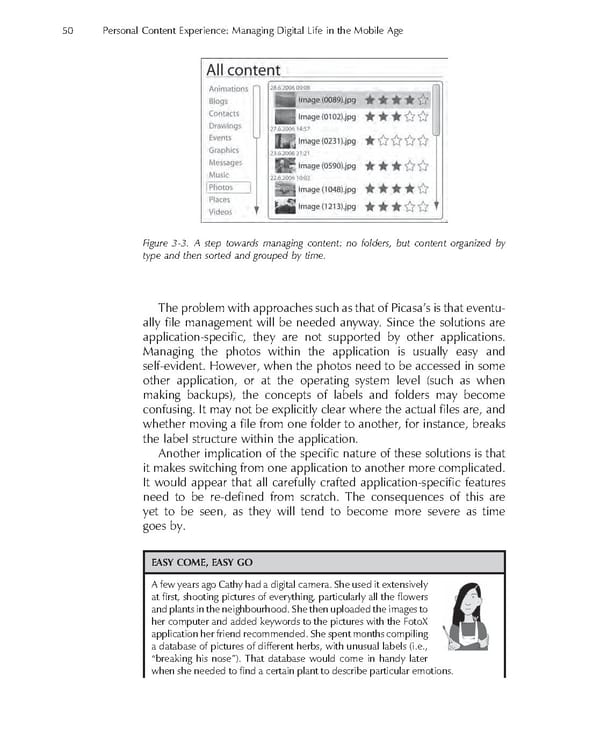
50 Personal Content Experience: Managing Digital Life in the Mobile Age Figure 3-3. A step towards managing content: no folders, but content organized by type and then sorted and grouped by time. The problem with approaches such as that of Picasa’s is that eventu- ally fi le management will be needed anyway. Since the solutions are application-specifi c, they are not supported by other applications. Managing the photos within the application is usually easy and self-evident. However, when the photos need to be accessed in some other application, or at the operating system level (such as when making backups), the concepts of labels and folders may become confusing. It may not be explicitly clear where the actual fi les are, and whether moving a fi le from one folder to another, for instance, breaks the label structure within the application. Another implication of the specifi c nature of these solutions is that it makes switching from one application to another more complicated. It would appear that all carefully crafted application-specifi c features need to be re-defi ned from scratch. The consequences of this are yet to be seen, as they will tend to become more severe as time goes by. EASY COME, EASY GO A few years ago Cathy had a digital camera. She used it extensively at fi rst, shooting pictures of everything, particularly all the fl owers and plants in the neighbourhood. She then uploaded the images to her computer and added keywords to the pictures with the FotoX application her friend recommended. She spent months compiling a database of pictures of different herbs, with unusual labels (i.e., “breaking his nose”). That database would come in handy later when she needed to fi nd a certain plant to describe particular emotions.
 Personal Content Experience Page 73 Page 75