

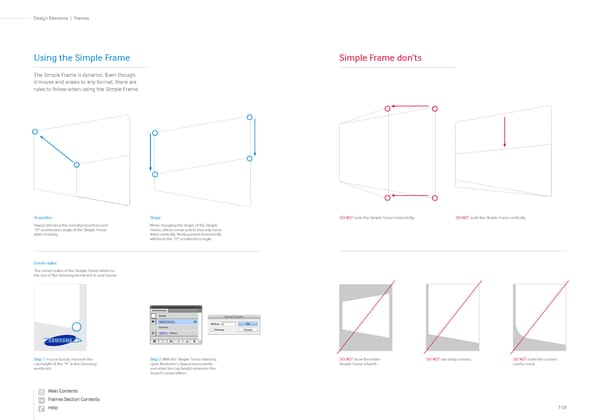
Proportion Always preserve the overall proportions and 10º acceleration angle of the Simple Frame when resizing. Shape When changing the shape of the Simple Frame, select corner points and only move them vertically. Moving points horizontally will break the 10° acceleration angle. Simple Frame don’ts DO NOT scale the Simple Frame horizontally. DO NOT show the entire Simple Frame artwork. DO NOT use sharp corners. DO NOT make the corners overly round. DO NOT scale the Simple Frame vertically. Using the Simple Frame The Simple Frame is dynamic. Even though it moves and scales to any format, there are rules to follow when using the Simple Frame. Corner radius The corner radius of the Simple Frame relates to the size of the Samsung wordmark in your layout. Step 2: With the Simple Frame selected, open Illustrator’s Appearance palette and enter the cap height value into the Round Corners effect. Step 1: In your layout, measure the cap height of the “N” in the Samsung wordmark. 119 Frames | Design Elements
 Samsung Brand Book Page 58 Page 60