

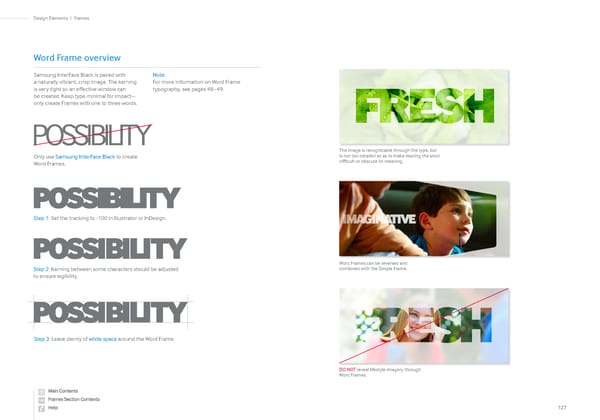
Word Frame overview Only use Samsung InterFace Black to create Word Frames. Step 1: Set the tracking to -100 in Illustrator or InDesign. Step 2: Kerning between some characters should be adjusted to ensure legibility. Samsung InterFace Black is paired with a naturally vibrant, crisp image. The kerning is very tight so an effective window can be created. Keep type minimal for impact— only create Frames with one to three words. Note: For more information on Word Frame typography, see pages 48–49. POSSIBILITY POSSI BI LI TY POSSI BI LI TY Step 3: Leave plenty of white space around the Word Frame. POSSIBILITY The image is recognizable through the type, but is not too detailed so as to make reading the word difficult or obscure its meaning. DO NOT reveal lifestyle imagery through Word Frames. Word Frames can be reversed and combined with the Simple Frame. 127 Frames | Design Elements
 Samsung Brand Book Page 62 Page 64