Startup Tools: Project Management


What is JavaForge?
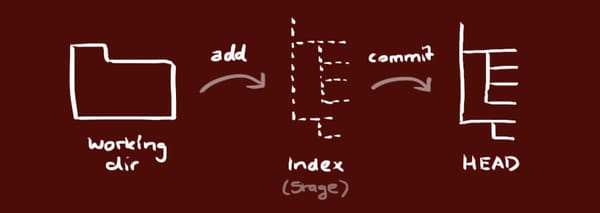
JavaForge is a free open source project hosting site. It is the home for hundreds of popular open source projects and thousands of open source enthusiasts. It is powered by Intland's codeBeamer software, runs on Amazon's cloud infrastructure, and leverages the Subversion, Git and Mercurial version control systems.
If you are looking for free hosting for your project, JavaForge will be a good fit. Don't let the name mislead you, you can develop in any programming language.
Sounds good, how can I join?
It's easy:
I have my project, but I need some help. Where do I go?
The software that powers JavaForge is called codeBeamer . If you are new to JavaForge, you might want to learn more on codeBeamer: Or you can browse or submit questions, feature requests or bug reports.
Video Tutorials

Download the free, fully functional version of codeBeamer
, the software that powers JavaForge. Test drive it within your own infrastructure.
Featured Projects on JavaForge
codeBeamer Eclipse Studio
- NEW! This Eclipse plugin gives reflectivity and mobility to codeBeamer users. You can create and edit tasks, bugs, requirements, edit and commit code quickly without leaving Eclipse. You can do it online and offline. Even while off-line, you can continue working on the code, create and modify tasks, requirements, bugs, and you can synchronize with your trackers and version control repositories as soon as the network access is re-established. CBES's task list also provides sophisticated task scheduling.Mercurial Plugin for Eclipse
- This is an Eclipse IDE plugin for the Mercurial distributed version control system. Mercurial is dedicated to speed and efficiency with a sane user interface.Tasks2GanttProject
- This project provides an export and import facility between codeBeamer, the Collaborative Application Lifecycle Management Solution, and GanttProject, a cross-platform desktop tool for project scheduling and management.CBLiveTracker
- This project provides a simple time tracking tool integrated with codeBeamer Trackers and Twitter (best way to share and discover what is happening right now).NetBeans ALM Plugin
- This plugin brings Application Lifecycle Management (ALM) features to the Netbeans Platform and IDE. NetBeans is a fully-featured Java IDE written completely in Java, with many modules available, such as: debugger, form editor, object browser, CVS, emacs integration, etc.codeBeamer Continuous Integration
- Jenkins is a popular and powerful build management system. The plugin developed in this project integrates Jenkins with codeBeamer. It is used for integrated tracker and build management at USDA.Luntbuild
- Luntbuild is a powerful build automation and management tool. Continuous Integration or nightly builds can be easily set using a clean web interface. Executed builds are well managed using functions such as search, categorization, promotion, patching, deletion, etc. It also acts as a central build artifacts repository and download area for your whole team.FlickrEdit
- FlickrEdit is a Java Desktop application that allows you to display and edit your photos in a variety of ways. It also allows you do download or upload your photos to and from Flickr.GeoWind
- GeoWind is an open source GIS platform that integrates OGC as implemented in GeoTools within NASA World Wind. The vision of this effort is the creation of an open geospatial system that enables the scientific modeling process to be closer to a 'real world' experience.Object Modeling System
- OMS is a pure Java, object-oriented modeling system framework. OMS enables interactive model construction and application based on components. OMS is a collaborative project active among the U.S. Department of Agriculture and partner agencies and organizations involved with agro-environmental modeling.

Recently, I heard folks at a few of my clients and at a couple conferences talking about why they are considering moving to using Kanban vs. Scrum. I have no preference to either method other than choosing the right agile development tool for the job. My concern derived from what I have heard identifies the beginnings of some myths and also demonstrates some of the hype around Kanban.
First, a clarification; Kanban with a capital (K) is the term David Anderson coined with respect to an agile development approach to driving change based on lean principles. Kanban with a little (k) represents the idea of the "sign" or "billboard" that provides the signal/visibility in a production line for additional demand for service of a particular station. It is one of the tools that enables just-in-time (JIT) action as described in the Toyota Production System.
Kanban, as Anderson explains in his book, relies on change occurring in more of an optimizing manner (see kaizen culture).
This is the significant difference between Kanban and Scrum. In a Kanban approach, an organization can begin with their current practices with a few exceptions. Kanban requires:
- A high degree of visibility into the state of all work queued and in progress
- Absolute respect for WIP limits
- A commitment to execution in a 'pull-based' manner from the prioritized work queue
Kanban also demands a focus on quality. In fact, this is Anderson's first step in his six-step recipe for Kanban. Quality comes first primarily because of the obvious cause-and-effect relationship to waste - and because it's generally more in the direct control of technical management. Working down his recipe, there tends to be less control and influence over the changes by technical management.
Now for the Myths and HypeMyth: Scrum has work pushed onto the team while in Kanban work is pulled into the system. This is incorrect. Scrum have work "pushed through the system." It is a pull-based agile development system with work pulled in larger batches (the Sprint Backlog). A Scrum implementation (as well as Kanban) becomes a 'push-based' system when the business doesn't respect the current proven capability of its teams to produce value and just continues to push demands for service into the system.
Hype: Kanban at its core is summarized by the premise: ' Stop Starting, Start Finishing'. The entire team's focus is on 'getting to done' for the tasks in progress. This statement is certainly true of Kanban, but the implication that Scrum does not have this focus is not true. Scrum done right has the same focus, delivering software sooner and doing so in priority order to maximize the value delivered to the customer. I've coached to Scrum teams for years that, wherever possible, everyone on the team should work on the highest priority item and get it done first before starting on the next item in the Sprint Backlog. This implies limiting WIP, as well as focusing on delivering the Backlog in rank order.
If the focus of a Scrum team is to just get everything in a Sprint Backlog into an in-progress state, regardless of priority, then you have a dysfunctional team that's most likely not working cross-functionally and certainly not focused on delivering the highest-value items first.
Hype: The statement, "The Kanban method is intuitive and is quickly and easily adopted by teams," to me is a statement that's used irresponsibly. It is too often a battle cry of those trying to sell Kanban as a product. It is the cop-out reason used by many organizations who are failing at Scrum and looking at Kanban.
In Part 2 of this post we'll continue the conversation about implementing Kanban and some of fundamentals that hold back Kanban and Scrum implementations.
Related topic: What is Kanban? How is Kanban different from Scrum?


Kanban is way for teams and organizations to their work, identify and eliminate bottlenecks and achieve dramatic operational improvements in terms of throughput and quality! Kanban is a method to improve whatever you do - whether software development, IT/ Ops, Staffing, Recruitment, Marketing and Sales, Procurement - in fact, almost any business function can benefit from applying Kanban to bring about significant benefits such as reduced lead time, increased throughput and much higher quality of products or services delivered!


What is codeBeamer?
codeBeamer ALM (Application Lifecycle Management) platform helps software development teams manage their processes from defining requirements to deliver releases. It also helps organizations meet their business goals, while supporting agility, predictability and traceability along the full application lifecycle. codeBeamer ALM's Demand Management provides a unique opportunity to collect, prioritize, evaluate and approve demands generated by different business units, and manage the demand lifecycle in one single platform.
With centralized management of processes, users and projects, codeBeamer increases productivity, provides full traceability, improves visibility and reduces costs dramatically. The end-to-end collaboration offered by codeBeamer helps teams achieve up to 50 percent increase in efficiency.
The core value of codeBeamer ALM is its Central Repository approach, which enables baselineing and traceability across all artifacts. The Development Management (SCCM) module offers superior Git integration.
How is codeBeamer different?
codeBeamer has a holistic view of Application Lifecycle Management. It really bridges the gap to provide Agile support for planning and development, while maintaining the established discipline of demand and requirements management, development, test and operations. It is tightly integrated with different version control systems (especially Git) and offers API for further interoperability. CodeBeamer is an integrated web-based solution for Demand - Requirements Management from Development to IT Operations. All modules can be used standalone or integrated.
codeBeamer's 7.2 version is the first implementation of SAFe (Scaled Agile Framework). It supports Teams, Projects and Programs to use agility at all three levels.
Customers Speak
Development Practice Manager, Aaron Kowall
Imaginet Microsoft ALM Partner of the Year 2011
At Imaginet, Telerik TeamPulse is the favored tool for our agile projects. It has allowed us to improve our process from requirements gathering through planning, managing and monitoring resulting in smoother deliveries. The rich interface and in-context guidance make onboarding fast and the TFS integration reduces friction for software development projects.
See all customer testimonials and case studies
1,000s of happy customers
Latest Blog Posts
Dec 12, 2013
By TeamPulse Product Blog
Nov 22, 2013
By Agile Blog
Nov 18, 2013
By TeamPulse Product Blog

The #1 Tool for Scrum, XP, Kanban,
and Lean Software Development
VersionOne pioneered the Agile and Scrum tool market more than a decade ago - way before other tool vendors jumped on the agile software bandwagon. Today we remain the only enterprise software company 100% dedicated to agile project and life cycle management since day one. Our mission is to help teams envision and deliver great software by providing the industry's most open, easy to adopt agile software management platform on the planet. From customer engagement to planning and tracking to source code integration, we help organizations scale their agile software development initiatives faster, easier, and smarter.
Customizable agile methodology templates that support Scrum, Kanban, Lean, Extreme Programming XP and Hybrid approaches to agile software development allow our software to be easily tailored to your unique needs. Whether you are a small team just getting started with Scrum, or an enterprise scaling agile across numerous teams, with VersionOne youll get the best agile tools in the industry backed by the pioneers in agile project management software. Today more than 50,000 teams in 170 countries use our products every day to plan, track, and scale their Agile, Scrum, Kanban, and Lean software projects.




Code Sprinters is a software development company focused on web applications development & agility. Founded by young enthusiasts we have been developing applications for others since 2007, as well as spreading & teaching agile methods - primarily Scrum.



I spent some slack time yesterday learning Ansible. Simple and absolutely awesome, plays well with Vagrant.

I liked the fact that Ansible modules can be written in any language. That's super powerful. And flexible. And awesome.

Ok after using #puppet, #cfengine and #ansible, my verdict is simple: Nothing beats the ease and flexibility of #ansible!




We chose Clarizen's comprehensive solutions, because of our complex business management needs. Its cloud-based model, user-friendly interface, pricing, and strong and helpful support team were very attractive.

Stay on top of everything
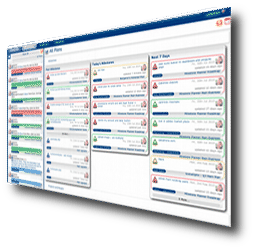
Stay on top of everything. On the Overview page for the project, see approaching tasks for the whole team or for each participant. The center column shows recent activity with completed and assigned tasks, comments from other members of the team and newly attached documents. A click takes you to the page where anything occurred. The pie-chart visually displays which portions of the project are completed, approaching, and overdue, at a glance.
Use any standard date format you like. Even international ones. Set regular days/hours, holidays, and extra work days, according to your team's schedule. Set user permissions for each team member, as owner, editor, reader, or client. Assign tasks to as many team members as you want.
Issue reports in Excel, Word, PDF, or plain text for Tasks (cost and last comment optional); Individual Assignments; Phases, Goals, Team & Obstacles; Comments, and a Cost Report. Or, export to Project KickStart for additional export access to Microsoft Project, Outlook, or ACT.
Exepron Critical Chain Project Management Workshops


Exepron allows an unlimited number of Users at no additional cost. Project Teams can collaborate with colleagues in real-time to Plan, Schedule and Execute projects from various global locations.
Exepron translates into multiple languages.
No license fees or upgrade costs, no User fees, no annual maintenance fees or contracts. Reap the benefits and pay only a monthly subscription fee, leaving the major IT costs to Exepron®
What is Critical Chain Project Management?
First introduced by Dr. Eliyahu M. Goldratt in 1997, Critical Chain Project Management (CCPM) is a relatively new, innovative method for planning, scheduling, and managing performance in a project environment based on Goldratt's Theory of Constraints (TOC). CCPM differs from traditional project management methods such as "PERT" and " Critical Path" (CPM), which relies on completing tasks in a specific order with inflexible scheduling. CCPM is applied in single-project and multi-project environments (PPM - Project Portfolio Management) where resources are shared across multiple projects.
The Critical Chain methodology and CCPM solution includes the following:
Changing harmful behaviors such as bad multitasking, the student syndrome and Parkinson's Law that cause delays during project execution.
A Project Network or Project Plan. Task time estimates reflect only the actual touch time, with all safety time or padding time removed. Safety time is automatically calculated and displayed in the Buffers.
A Project Schedule displaying the critical chain and the buffers. The critical chain is the longest chain of task and resource dependency, which includes resolving resource contention.
A Drum, also known as the virtual drum, strategic resource or integration point. In multi-project environments the Drum staggers, synchronizes and schedules the release of projects in the Pipeline.
Buffer Management provides process control and visibility. The critical chain method includes a single main project buffer inserted at the end of the longest chain of task and resource dependency and a number of feeding buffers inserted at integration points with the critical chain. Buffers provide an effective early warning signal and will pinpoint where task slippage occurs and timely intervention is required.
Using the Critical Chain methodology, resources are applied to the tasks requiring immediate attention with greater flexibility, resulting in keeping projects on schedule, within budget and delivered on time. Exepron's CCPM scheduling software is a cloud-based, online solution that can be accessed anytime, anywhere - with just a web connection. For a limited time, Exepron is offering a 30 day free trial of our project management software (no credit card required). Synchronize up to 50 projects, including 15 GB of storage capacity with an unlimited number of users.