

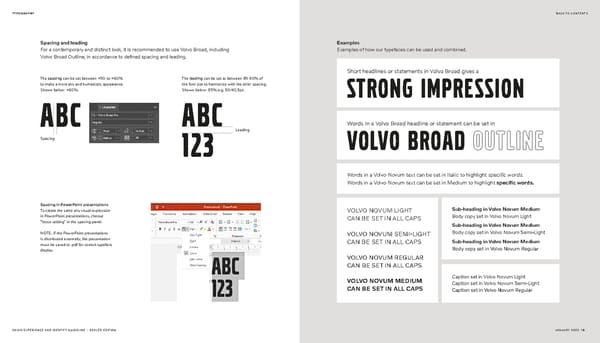
TYPOGRAPHY BACK TO CONTENTS Spacing and leading Examples For a contemporary and distinct look, it is recommended to use Volvo Broad, including Examples of how our typefaces can be used and combined. Volvo Broad Outline, in accordance to defined spacing and leading. Short headlines or statements in Volvo Broad gives a The spacing can be set between +50 to +60% The leading can be set to between 85-90% of to make a more airy and humanistic appearance. the font size to harmonize with the airier spacing. Shown below: +60%. Shown below: 85% e.g. 50/42,5pt. strong impression ABC ABC Words in a Volvo Broad headline or statement can be set in Leading Spacing 123 Volvo broad outline Words in a Volvo Novum text can be set in Italic to highlight specific words. Words in a Volvo Novum text can be set in Medium to highlight specific words. Spacing in PowerPoint presentations To create the same airy visual expression VOLVO NOVUM LIGHT Sub-heading in Volvo Novum Medium in PowerPoint presentations, choose CAN BE SET IN ALL CAPS Body copy set in Volvo Novum Light “loose setting” in the spacing panel. Sub-heading in Volvo Novum Medium NOTE: If the PowerPoint presentations VOLVO NOVUM SEMI-LIGHT Body copy set in Volvo Novum Semi-Light is distributed externally, the presentation CAN BE SET IN ALL CAPS Sub-heading in Volvo Novum Medium must be saved to .pdf for correct typeface Body copy set in Volvo Novum Regular display. VOLVO NOVUM REGULAR CAN BE SET IN ALL CAPS VOLVO NOVUM MEDIUM Caption set in Volvo Novum Light Caption set in Volvo Novum Semi-Light CAN BE SET IN ALL CAPS Caption set in Volvo Novum Regular VOLVO EXPERIENCE AND IDENTITY GUIDELINE – DEALER EDITION JANUARY 2022 18
 Volvo Brand Book Page 17 Page 19