

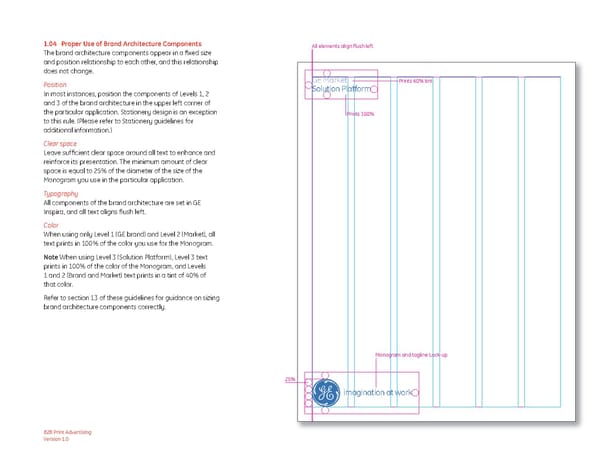
1.04 Proper Use of Brand Architecture Components All elements align flush left The brand architecture components appear in a fixed size and position relationship to each other, and this relationship does not change. Position GE Market Prints 40% tint In most instances, position the components of Levels 1, 2 Solution Platform and 3 of the brand architecture in the upper left corner of the particular application. Stationery design is an exception Prints 100% to this rule. (Please refer to Stationery guidelines for additional information.) Clear space Leave sufficient clear space around all text to enhance and reinforce its presentation. The minimum amount of clear space is equal to 25% of the diameter of the size of the Monogram you use in the particular application. Typography All components of the brand architecture are set in GE Inspira, and all text aligns flush left. Color When using only Level 1 (GE brand) and Level 2 (Market), all text prints in 100% of the color you use for the Monogram. Note When using Level 3 (Solution Platform), Level 3 text prints in 100% of the color of the Monogram, and Levels 1 and 2 (Brand and Market) text prints in a tint of 40% of that color. Refer to section 13 of these guidelines for guidance on sizing brand architecture components correctly. Monogram and tagline Lock-up 25% imagination at work B2B Print Advertising Version 1.0
 General Electric Brand Book Page 7 Page 9