

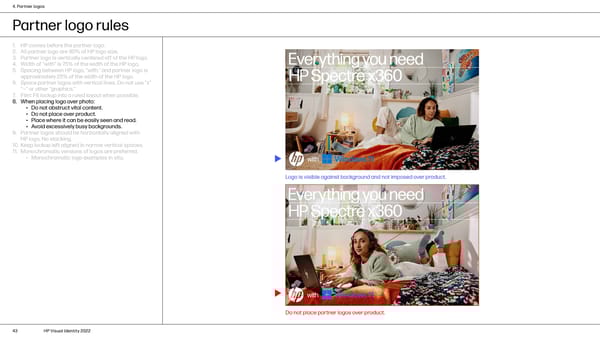
4. Partner logos Partner logo rules 1. HP comes before the partner logo. 2. All partner logo are 90% of HP logo size. 3. Partner logo is vertically centered off of the HP logo. 4. Width of “with” is 75% of the width of the HP logo. 5. Spacing between HP logo, “with,” and partner logo is approximately 25% of the width of the HP logo. 6. Space partner logos with vertical lines. Do not use “x” “—” or other “graphics.” 7. Film: Fit lockup into a ruled layout when possible. 8. When placing logo over photo: • Do not obstruct vital content. • Do not place over product. • Place where it can be easily seen and read. • Avoid excessively busy backgrounds. 9. Partner logos should be horizontally aligned with HP logo. No stacking. 10. Keep lockup left aligned in narrow vertical spaces. 11. Monochromatic versions of logos are preferred. • Monochromatic logo examples in situ. Logo is visible against background and not imposed over product. Do not place partner logos over product. 43 HP Visual Identity 2022
 HP Brand Book Page 42 Page 44