

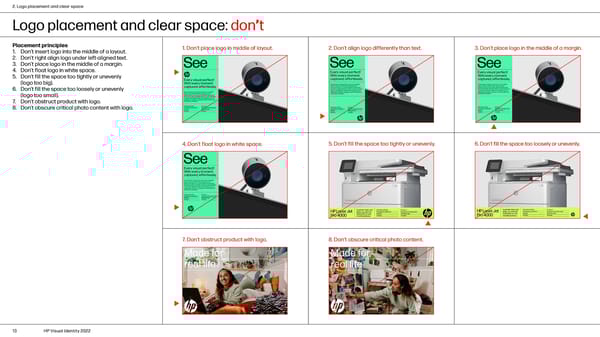
2. Logo placement and clear space Logo placement and clear space: don’t Placement principles 1. Don’t place logo in middle of layout. 2. Don’t align logo differently than text. 3. Don’t place logo in the middle of a margin. 1. Don’t insert logo into the middle of a layout. 2. Don’t right align logo under left-aligned text. 3. Don’t place logo in the middle of a margin. 4. Don’t float logo in white space. 5. Don’t fill the space too tightly or unevenly (logo too big). 6. Don’t fill the space too loosely or unevenly (logo too small). 7. Don’t obstruct product with logo. 8. Don’t obscure critical photo content with logo. 4. Don’t float logo in white space. 5. Don’t fill the space too tightly or unevenly. 6. Don’t fill the space too loosely or unevenly. 7. Don’t obstruct product with logo. 8. Don’t obscure critical photo content. 13 HP Visual Identity 2022
 HP Brand Book Page 12 Page 14