

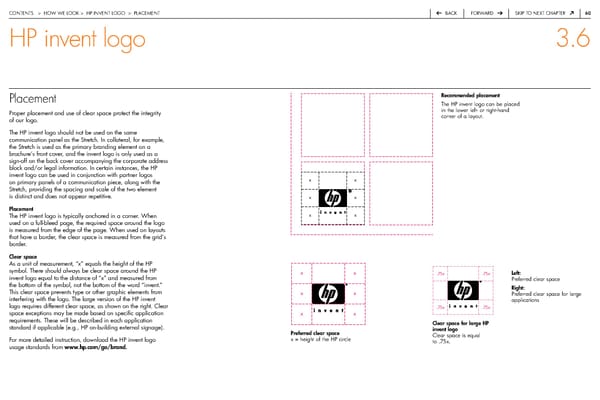
contentS > how we Look > hp inVent LoGo > pLaceMent back forward Skip to next chapter 60 HP invent logo 3.6 Placement recommended placement the hp invent logo can be placed proper placement and use of clear space protect the integrity in the lower left- or right-hand of our logo. corner of a layout. the hp invent logo should not be used on the same communication panel as the Stretch. in collateral, for example, the Stretch is used as the primary branding element on a brochure’s front cover, and the invent logo is only used as a sign-off on the back cover accompanying the corporate address block and/or legal information. in certain instances, the hp invent logo can be used in conjunction with partner logos on primary panels of a communication piece, along with the x x Stretch, providing the spacing and scale of the two element is distinct and does not appear repetitive. x x Placement the hp invent logo is typically anchored in a corner. when x x used on a full-bleed page, the required space around the logo is measured from the edge of the page. when used on layouts that have a border, the clear space is measured from the grid’s border. Clear space as a unit of measurement, “x” equals the height of the hp symbol. there should always be clear space around the hp x x .75x .75x Left: invent logo equal to the distance of “x” and measured from preferred clear space the bottom of the symbol, not the bottom of the word “invent.” right: this clear space prevents type or other graphic elements from x x preferred clear space for large interfering with the logo. the large version of the hp invent applications logo requires different clear space, as shown on the right. clear .75x .75x space exceptions may be made based on specific application x x requirements. these will be described in each application Clear space for large HP standard if applicable (e.g., hp on-building external signage). invent logo Preferred clear space clear space is equal for more detailed instruction, download the hp invent logo x = height of the hp circle to .75x. usage standards from www.hp.com/go/brand.
 HP Brand Book Page 60 Page 62