

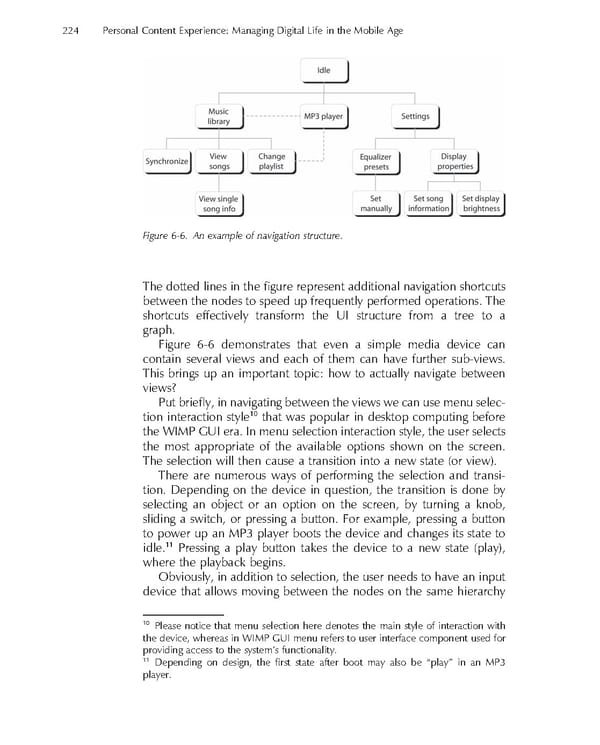
224 Personal Content Experience: Managing Digital Life in the Mobile Age Figure 6-6. An example of navigation structure. The dotted lines in the fi gure represent additional navigation shortcuts between the nodes to speed up frequently performed operations. The shortcuts effectively transform the UI structure from a tree to a graph. Figure 6-6 demonstrates that even a simple media device can contain several views and each of them can have further sub-views. This brings up an important topic: how to actually navigate between views? Put briefl y, in navigating between the views we can use menu selec- 10 tion interaction style that was popular in desktop computing before the WIMP GUI era. In menu selection interaction style, the user selects the most appropriate of the available options shown on the screen. The selection will then cause a transition into a new state (or view). There are numerous ways of performing the selection and transi- tion. Depending on the device in question, the transition is done by selecting an object or an option on the screen, by turning a knob, sliding a switch, or pressing a button. For example, pressing a button to power up an MP3 player boots the device and changes its state to 11 idle. Pressing a play button takes the device to a new state (play), where the playback begins. Obviously, in addition to selection, the user needs to have an input device that allows moving between the nodes on the same hierarchy 10 Please notice that menu selection here denotes the main style of interaction with the device, whereas in WIMP GUI menu refers to user interface component used for providing access to the system’s functionality. 11 Depending on design, the fi rst state after boot may also be “play” in an MP3 player.
 Personal Content Experience Page 247 Page 249