

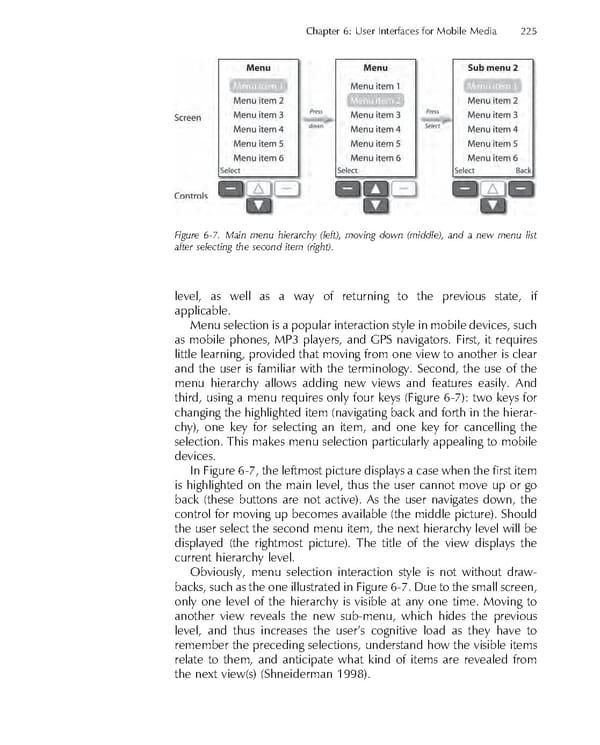
Chapter 6: User Interfaces for Mobile Media 225 Figure 6-7. Main menu hierarchy (left), moving down (middle), and a new menu list after selecting the second item (right). level, as well as a way of returning to the previous state, if applicable. Menu selection is a popular interaction style in mobile devices, such as mobile phones, MP3 players, and GPS navigators. First, it requires little learning, provided that moving from one view to another is clear and the user is familiar with the terminology. Second, the use of the menu hierarchy allows adding new views and features easily. And third, using a menu requires only four keys (Figure 6-7): two keys for changing the highlighted item (navigating back and forth in the hierar- chy), one key for selecting an item, and one key for cancelling the selection. This makes menu selection particularly appealing to mobile devices. In Figure 6-7, the leftmost picture displays a case when the fi rst item is highlighted on the main level, thus the user cannot move up or go back (these buttons are not active). As the user navigates down, the control for moving up becomes available (the middle picture). Should the user select the second menu item, the next hierarchy level will be displayed (the rightmost picture). The title of the view displays the current hierarchy level. Obviously, menu selection interaction style is not without draw- backs, such as the one illustrated in Figure 6-7. Due to the small screen, only one level of the hierarchy is visible at any one time. Moving to another view reveals the new sub-menu, which hides the previous level, and thus increases the user’s cognitive load as they have to remember the preceding selections, understand how the visible items relate to them, and anticipate what kind of items are revealed from the next view(s) (Shneiderman 1998).
 Personal Content Experience Page 248 Page 250