

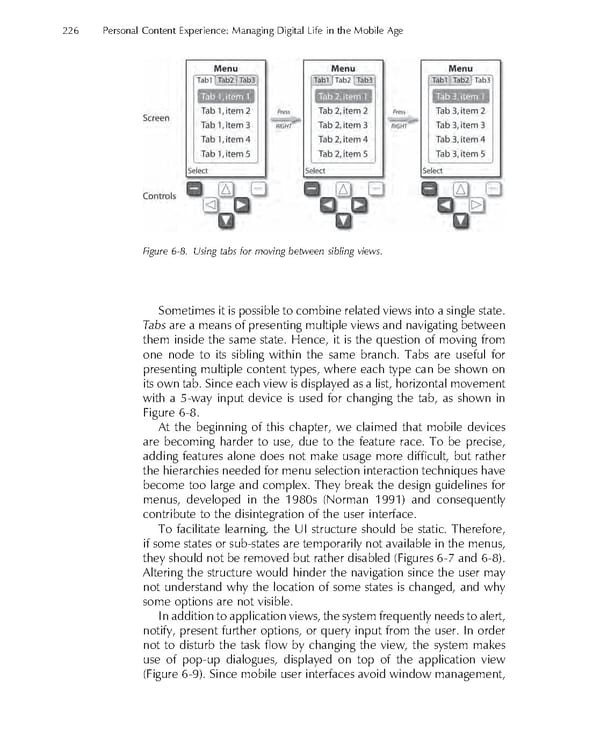
226 Personal Content Experience: Managing Digital Life in the Mobile Age Figure 6-8. Using tabs for moving between sibling views. Sometimes it is possible to combine related views into a single state. Tabs are a means of presenting multiple views and navigating between them inside the same state. Hence, it is the question of moving from one node to its sibling within the same branch. Tabs are useful for presenting multiple content types, where each type can be shown on its own tab. Since each view is displayed as a list, horizontal movement with a 5-way input device is used for changing the tab, as shown in Figure 6-8. At the beginning of this chapter, we claimed that mobile devices are becoming harder to use, due to the feature race. To be precise, adding features alone does not make usage more diffi cult, but rather the hierarchies needed for menu selection interaction techniques have become too large and complex. They break the design guidelines for menus, developed in the 1980s (Norman 1991) and consequently contribute to the disintegration of the user interface. To facilitate learning, the UI structure should be static. Therefore, if some states or sub-states are temporarily not available in the menus, they should not be removed but rather disabled (Figures 6-7 and 6-8). Altering the structure would hinder the navigation since the user may not understand why the location of some states is changed, and why some options are not visible. In addition to application views, the system frequently needs to alert, notify, present further options, or query input from the user. In order not to disturb the task fl ow by changing the view, the system makes use of pop-up dialogues, displayed on top of the application view (Figure 6-9). Since mobile user interfaces avoid window management,
 Personal Content Experience Page 249 Page 251