

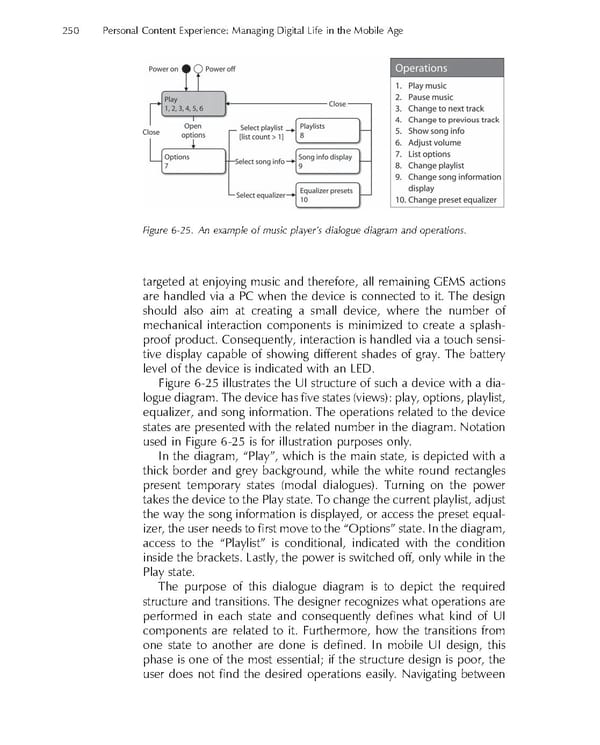
250 Personal Content Experience: Managing Digital Life in the Mobile Age Figure 6-25. An example of music player’s dialogue diagram and operations. targeted at enjoying music and therefore, all remaining GEMS actions are handled via a PC when the device is connected to it. The design should also aim at creating a small device, where the number of mechanical interaction components is minimized to create a splash- proof product. Consequently, interaction is handled via a touch sensi- tive display capable of showing different shades of gray. The battery level of the device is indicated with an LED. Figure 6-25 illustrates the UI structure of such a device with a dia- logue diagram. The device has fi ve states (views): play, options, playlist, equalizer, and song information. The operations related to the device states are presented with the related number in the diagram. Notation used in Figure 6-25 is for illustration purposes only. In the diagram, “Play”, which is the main state, is depicted with a thick border and grey background, while the white round rectangles present temporary states (modal dialogues). Turning on the power takes the device to the Play state. To change the current playlist, adjust the way the song information is displayed, or access the preset equal- izer, the user needs to fi rst move to the “Options” state. In the diagram, access to the “Playlist” is conditional, indicated with the condition inside the brackets. Lastly, the power is switched off, only while in the Play state. The purpose of this dialogue diagram is to depict the required structure and transitions. The designer recognizes what operations are performed in each state and consequently defi nes what kind of UI components are related to it. Furthermore, how the transitions from one state to another are done is defi ned. In mobile UI design, this phase is one of the most essential; if the structure design is poor, the user does not fi nd the desired operations easily. Navigating between
 Personal Content Experience Page 273 Page 275