

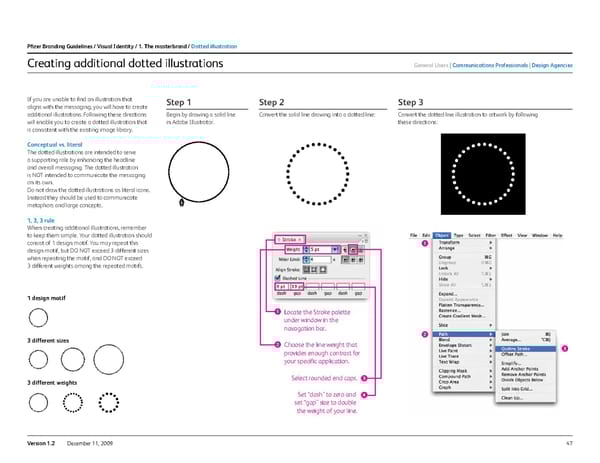
47 Version 1.2 December 11, 2009 Creating additional dotted illustrations If you are unable to find an illustration that aligns with the messaging, you will have to create additional illustrations. Following these directions will enable you to create a dotted illustration that is consistent with the existing image library. c onceptual vs. literal The dotted illustrations are intended to serve a supporting role by enhancing the headline and overall messaging. The dotted illustration is NOT intended to communicate the messaging on its own. Do not draw the dotted illustrations as literal icons. Instead they should be used to communicate metaphors and large concepts. 1, 3, 3 rule When creating additional illustrations, remember to keep them simple. Your dotted illustration should consist of 1 design motif. You may repeat this design motif, but DO NOT exceed 3 different sizes when repeating the motif, and DO NOT exceed 3 different weights among the repeated motifs. Locate the Stroke palette under window in the navagation bar. Choose the line weight that provides enough contrast for your specific application. Select rounded end caps. Set “dash” to zero and set “gap” size to double the weight of your line. 1 design motif 3 different sizes 3 different weights step 1 Begin by drawing a solid line in Adobe Illustrator. step 2 Convert the solid line drawing into a dotted line: step 3 Convert the dotted line illustr ation to artwork by following these directions: Pfizer Branding Guidelines / Visual i dentity / 1. the masterbrand / dotted illustration General users c ommunications Professionals design agencies
 Pfizer Brand Book Page 46 Page 48