

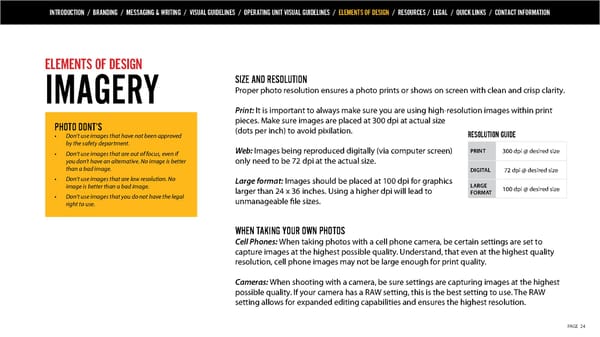
INTRODUCTION / BRANDING / MESSAGING & WRITING / VISUAL GUIDELINES / OPERATING UNIT VISUAL GUIDELINES / ELEMENTS OF DESIGN / RESOURCES / LEGAL / QUICK LINKS / CONTACT INFORMATION ELEMENTS OF DESIGN SIZE AND RESOLUTION IMAGERY Proper photo resolution ensures a photo prints or shows on screen with clean and crisp clarity. Print: It is important to always make sure you are using high-resolution images within print PHOTO DONT’S pieces. Make sure images are placed at 300 dpi at actual size • Don’t use images that have not been approved (dots per inch) to avoid pixilation. RESOLUTION GUIDE by the safety department. • Don’t use images that are out of focus, even if Web: Images being reproduced digitally (via computer screen) PRINT 300 dpi @ desired size you don’t have an alternative. No image is better only need to be 72 dpi at the actual size. than a bad image. DIGITAL 72 dpi @ desired size • Don’t use images that are low resolution. No Large format: Images should be placed at 100 dpi for graphics image is better than a bad image. larger than 24 x 36 inches. Using a higher dpi will lead to LARGE 100 dpi @ desired size • Don’t use images that you do not have the legal FORMAT right to use. unmanageable file sizes. WHEN TAKING YOUR OWN PHOTOS Cell Phones: When taking photos with a cell phone camera, be certain settings are set to capture images at the highest possible quality. Understand, that even at the highest quality resolution, cell phone images may not be large enough for print quality. Cameras: When shooting with a camera, be sure settings are capturing images at the highest possible quality. If your camera has a RAW setting, this is the best setting to use. The RAW setting allows for expanded editing capabilities and ensures the highest resolution. PAGE 24
 Quanta Services Brand Book Page 23 Page 25