RELAYTO Buyers' Presentation
This is a RELAYTO presentation about the RELAYTO platform. Unleash your ideas with smarter publications, presentations and proposals.
Pitch
Template
Demo
Buyer Hub
Sales
Main
# Turn your B2B content into your #1 revenue & engagement channel Transform content to inform and inspire, ensuring your messages resonate and drive action. Start free trial


## 5,713,219 interactive experiences built with RELAYTO A row of award badges from G2 and other sources. A row of award badges. Eight G2 'SPRING 2025' badges with various titles: 'Grid Leader', 'Momentum Leader', 'Most Implementable', 'Best Usability', 'Easiest To Do Business With', 'Best Est. ROI' (Small Business), 'Easiest To Use' (Mid-Market), and 'Best Results'. To the right are two other badges: 'GetApp BEST FUNCTIONALITY & FEATURES 2024' and 'Capterra SHORTLIST 2024'. A row of award badges from G2 and other sources. Loved by sales, marketing & corp comms teams A grid of logos for various companies. A grid of 21 logos arranged in 3 rows and 7 columns. Row 1: Fortune 500 Mining, Salesforce, Omnicom Group, RenaissanceRe, Franco-Nevada, FinTech Innovation Lab, Top 3 Big Pharma. Row 2: QFC Qatar Financial Centre, University of Oxford, alpega, Westinghouse, ALTA Equipment Group, UBA United Benefit Advisors, HOTSPOT Therapeutics. Row 3: LiUNA! Feed the Power, VIVESCIA, Eastridge Workforce Solutions, CENTRI DENTISTICI DENTALPRO, iDeals, PATRIOT Growth Insurance Services, TEAM. A grid of logos for various companies.

## Democratizing Engagement From sales to marketing and comms, RELAYTO provides the tools to connect with your audience and drive results. A circular sunburst diagram illustrating the structure of RELAYTO's engagement tools, organized into three main functional areas: Marketing, Sales, and Comms. The diagram is a circular sunburst chart with three main functional areas: Marketing, Sales, and Comms. Each area is represented by a colored wedge, with a central white circle and a dark grey arrow pointing towards the center. The Marketing wedge is dark purple, Sales is dark red, and Comms is dark blue. Each wedge is divided into sub-segments, which are further divided into specific tools or content types. - Marketing** (Dark Purple Wedge) - Demand Marketing** - Micro-content - Lead magnets (e-books) - Downloadables - Customer Marketing** - Resource hubs - Onboarding - Product collateral - Content & Brand Marketing** - Event hubs - Event brochure - Post-event - Product & Solution Marketing** - ABM podcast - Product literature - Case studies - Solution hubs - Sales** (Dark Red Wedge) - Buyer Enablement** - Digital sales rooms - Proposals - Case studies - Sales & Partner Enablement** - Partner hub - Pitch deck - Self-guided sites - Pre-sales** - Leave-behinds - Demo automation - Product tours - Comms** (Dark Blue Wedge) - Investor Relations / ESG** - ESG report - Annual report - Investor decks & updates - Employee Benefits & Engagement** - Open enrollment guides - Benefits hub - Handbooks - Training** - Resource libraries - Onboarding guides - Best practices A circular sunburst diagram illustrating the structure of RELAYTO's engagement tools, organized into three main functional areas: Marketing, Sales, and Comms.

This is a modal window.
### End-to-end content transformation Source Style Image Video Audio Image of a colorful sphere with a rainbow gradient, representing a source image. A square image with a dark background. On the left, there is a vertical list of seven pink circular icons. On the right, there is a large, glowing sphere with a rainbow gradient, transitioning from purple at the top to red at the bottom. Image of a colorful sphere with a rainbow gradient, representing a source image. ### Image generation Generate images from text prompts, images, or a combination of both. The generated images can be used for various purposes, such as social media posts, website banners, or product images. Image of a hand holding a glowing orange sphere, representing a source image. A square image with a dark background. In the center, a hand is holding a glowing orange sphere. The sphere has a bright orange core and a darker orange outer layer. Image of a hand holding a glowing orange sphere, representing a source image. #### Image generation for any image Generate images from any image, such as a photograph of a person or a landscape. The generated images can be used for various purposes, such as social media posts, website banners, or product images. Image of a computer screen displaying a video player interface, representing a source image. A square image with a dark background. In the center, there is a computer screen displaying a video player interface. The interface includes a video frame, a progress bar, and various control buttons. Image of a computer screen displaying a video player interface, representing a source image. ### Audio generation Generate audio from text prompts, images, or a combination of both. The generated audio can be used for various purposes, such as social media posts, website banners, or product images.
## Create customer journeys with hubs Give teams across every department a home base for all the content they need to get their work done, whether you're talking sales enablement, ABM campaigns, HR employee resources, or anything in between. Three blurred screenshots of user interface hubs. The image displays three blurred screenshots of user interface hubs, likely from a software application. The top two screenshots are side-by-side, showing a dark-themed interface with a central content area and a sidebar. The bottom screenshot is partially visible and shows a pink circular button with the text 'Get Started'. Three blurred screenshots of user interface hubs.

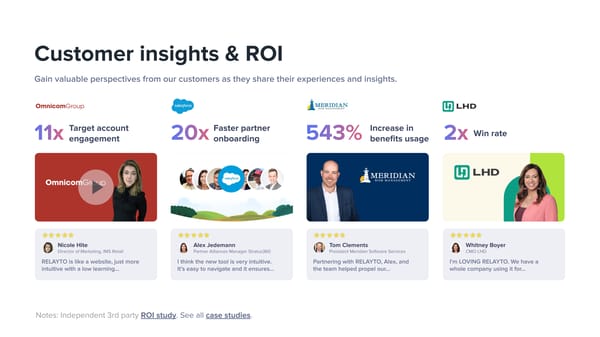
## Customer insights & ROI Gain valuable perspectives from our customers as they share their experiences and insights. **OmnicomGroup** **11x** Target account engagement Video thumbnail for OmnicomGroup featuring Nicole Hite, Director of Marketing, IMS Retail. The thumbnail shows her on a red background with the OmnicomGroup logo and a play button icon. Video thumbnail for OmnicomGroup featuring Nicole Hite, Director of Marketing, IMS Retail. The thumbnail shows her on a red background with the OmnicomGroup logo and a play button icon. Five yellow stars indicating a 5-star rating. Five yellow stars indicating a 5-star rating. **Nicole Hite** Director of Marketing, IMS Retail RELAYTO is like a website, just more intuitive with a low learning... Salesforce logo. Salesforce logo. **20x** Faster partner onboarding Video thumbnail for Salesforce featuring Alex Jedemann, Partner Alliances Manager Stratus360. The thumbnail shows a group of people in circular frames with the Salesforce logo, set against a landscape background. Video thumbnail for Salesforce featuring Alex Jedemann, Partner Alliances Manager Stratus360. The thumbnail shows a group of people in circular frames with the Salesforce logo, set against a landscape background. Five yellow stars indicating a 5-star rating. Five yellow stars indicating a 5-star rating. **Alex Jedemann** Partner Alliances Manager Stratus360 I think the new tool is very intuitive. It's easy to navigate and it ensures... Meridian Risk Management logo. Meridian Risk Management logo. **543%** Increase in benefits usage Video thumbnail for Meridian Risk Management featuring Tom Clements, President Meridian Software Services. The thumbnail shows him on a dark blue background with the Meridian Risk Management logo. Video thumbnail for Meridian Risk Management featuring Tom Clements, President Meridian Software Services. The thumbnail shows him on a dark blue background with the Meridian Risk Management logo. Five yellow stars indicating a 5-star rating. Five yellow stars indicating a 5-star rating. **Tom Clements** President Meridian Software Services Partnering with RELAYTO, Alex, and the team helped propel our... LHD logo. LHD logo. **2x** Win rate Video thumbnail for LHD featuring Whitney Boyer, CMO LHD. The thumbnail shows her on a yellow and green background with the LHD logo. Video thumbnail for LHD featuring Whitney Boyer, CMO LHD. The thumbnail shows her on a yellow and green background with the LHD logo. Five yellow stars indicating a 5-star rating. Five yellow stars indicating a 5-star rating. **Whitney Boyer** CMO LHD I'm LOVING RELAYTO. We have a whole company using it for... Notes: Independent 3rd party ROI study. See all case studies.
100% 100% 100% 100% Award badge for Best Overall Performance Award badge for Best Overall Performance Award badge for Best Overall Performance Award badge for Best Overall Performance **Best Overall Performance & Momentum Leader** The only company in the S&P 500 to achieve this award for the 10th year. A grid of 12 award badges arranged in two rows of six. A grid of 12 award badges arranged in two rows of six.
## Join us Digital winners deploy RELAYTO to transform conventional content into WOW outcomes, AT SCALE. Let's win together. Start free trial Pricing Let's meet