

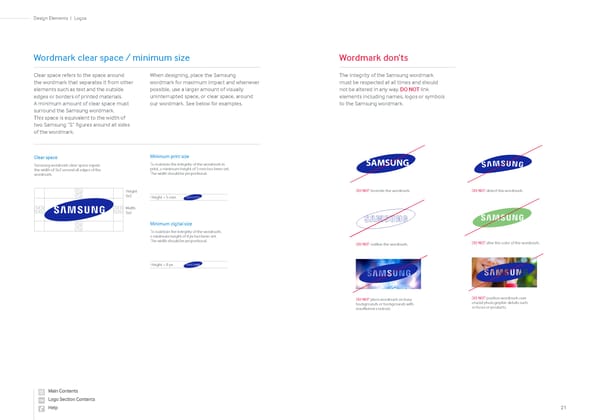
Logos Design Elements 21 | Clear space refers to the space around the wordmark that separates it from other elements such as text and the outside edges or borders of printed materials. A minimum amount of clear space must surround the Samsung wordmark. This space is equivalent to the width of two Samsung “S” figures around all sides of the wordmark. When designing, place the Samsung wordmark for maximum impact and whenever possible, use a larger amount of visually uninterrupted space, or clear space, around our wordmark. See below for examples. Wordmark clear space / minimum size Clear space Samsung wordmark clear space equals the width of Sx2 around all edges of the wordmark. Minimum print size To maintain the integrity of the wordmark in print, a minimum height of 5 mm has been set. The width should be proportional. Minimum digital size To maintain the integrity of the wordmark, a minimum height of 8 px has been set. The width should be proportional. Height = 5 mm Height = 8 px The integrity of the Samsung wordmark must be respected at all times and should not be altered in any way. DO NOT link elements including names, logos or symbols to the Samsung wordmark. Wordmark don’ts DO NOT recreate the wordmark. DO NOT distort the wordmark. SAMSUNG SAMSUNG DO NOT outline the wordmark. SAMSUNG DO NOT place wordmark on busy backgrounds or backgrounds with insufficient contrast. DO NOT alter the color of the wordmark. SAMSUNG DO NOT position wordmark over crucial photographic details such as faces or products. Height Sx2 Width Sx2
 Samsung Brand Book Page 9 Page 11