

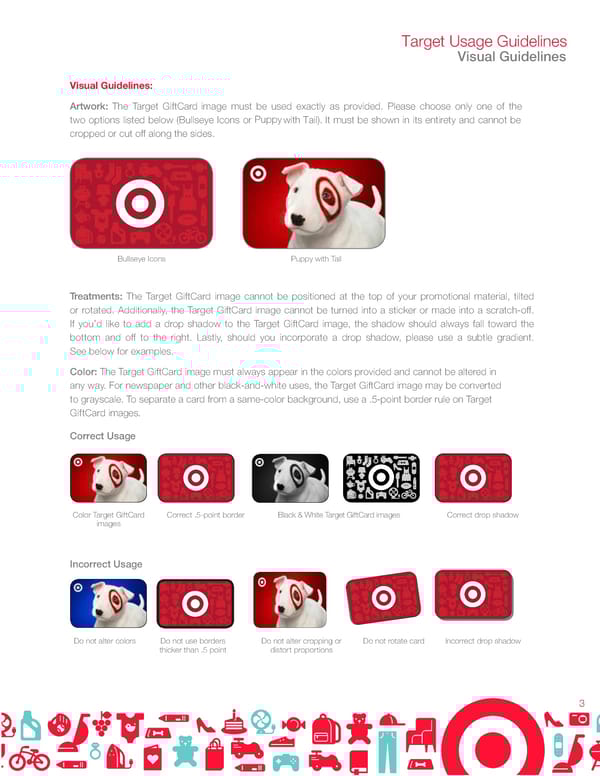
Target Usage Guidelines Visual Guidelines Visual Guidelines: Artwork: The Target GiftCard image must be used exactly as provided. Please choose only one of the Puppy two options listed below (Bullseye Icons or with Tail). It must be shown in its entirety and cannot be cropped or cut off along the sides. Bullseye Icons Puppy with Tail Treatments: The Target GiftCard image cannot be positioned at the top of your promotional material, tilted or rotated. Additionally, the Target GiftCard image cannot be turned into a sticker or made into a scratch-off. If you’d like to add a drop shadow to the Target GiftCard image, the shadow should always fall toward the bottom and off to the right. Lastly, should you incorporate a drop shadow, please use a subtle gradient. See below for examples. Color: The Target GiftCard image must always appear in the colors provided and cannot be altered in any way. For newspaper and other black-and-white uses, the Target GiftCard image may be converted to grayscale. To separate a card from a same-color background, use a .5-point border rule on Target GiftCard images. Correct Usage Color Target GiftCard Correct .5-point border Black & White Target GiftCard images Correct drop shadow images Incorrect Usage Do not alter colors Do not use borders Do not alter cropping or Do not rotate card Incorrect drop shadow thicker than .5 point distort proportions 3
 Target Brand Book Page 2 Page 4