RELAYTO Buyers' Presentation
This is a RELAYTO presentation about the RELAYTO platform. Unleash your ideas with smarter publications, presentations and proposals.
Pitch
Template
Demo
Examples
Buyer Hub
Sales
# Turn your B2B content into your #1 revenue & engagement channel Transform content to inform and inspire, ensuring your messages resonate and drive action. Start free trial



###### 5,713,219 interactive experiences built with RELAYTO G2 Spring 2025 badge: Grid Leader G2 Spring 2025 badge: Grid Leader G2 Spring 2025 badge: Momentum Leader G2 Spring 2025 badge: Momentum Leader G2 Spring 2025 badge: Most Implementable G2 Spring 2025 badge: Most Implementable G2 Spring 2025 badge: Best Usability G2 Spring 2025 badge: Best Usability G2 Spring 2025 badge: Easiest To Do Business With G2 Spring 2025 badge: Easiest To Do Business With G2 Spring 2025 badge: Best Est. ROI Small Business G2 Spring 2025 badge: Best Est. ROI Small Business G2 Spring 2025 badge: Easiest To Use Mid-Market G2 Spring 2025 badge: Easiest To Use Mid-Market G2 Spring 2025 badge: Best Results G2 Spring 2025 badge: Best Results GetApp badge: Best Functionality & Features 2024 GetApp badge: Best Functionality & Features 2024 Capterra badge: Shortlist 2024 Capterra badge: Shortlist 2024 Loved by sales, marketing & corp comms teams **Fortune 500** Mining Salesforce logo Salesforce logo **OmnicomGroup** *RenaissanceRe* **★ Franco-Nevada** **FinTech** Innovation Lab **Top 3** Big Pharma **QFC** Qatar Financial Centre **UNIVERSITY OF** **OXFORD** **alpega** **Westinghouse** **ALTA** EQUIPMENT GROUP **UBA** United Benefit Advisors® **HOTSPOT** THERAPEUTICS **LiUNA!** Feel the Power **VIVESCIA** **Eastridge** WORKFORCE SOLUTIONS **DENTAL PRO** CENTRI DENTISTICI **iDeals** **PATRIOT** GROWTH INSURANCE SERVICES **TEAM**®
Image: A dark, blurry, horizontal bar with a gradient, possibly a UI element or a stylized graphic. A dark, blurry, horizontal bar with a gradient, possibly a UI element or a stylized graphic. The bar is dark grey or black on the left and fades into a lighter grey on the right. It is positioned in the upper left quadrant of the image.

## Democratizing Engagement From sales to marketing and comms, RELAYTO provides the tools to connect with your audience and drive results. A circular diagram illustrating the RELAYTO platform's engagement tools across Marketing, Sales, and Comms departments. The diagram is a circular chart divided into three main sectors: Marketing (top), Sales (bottom-left), and Comms (bottom-right). Each sector is further divided into sub-categories and specific tools. - Marketing** - Demand Marketing - Micro-content - Lead magnets (e-books) - Downloadables - Resource hubs - Onboarding - Account-based Marketing - Product & Solution Marketing - Personalized hubs - Landing pages - ABM podcast - Product literature - Case studies - Solution hubs - Customer Marketing - Product collateral - Event hubs - Event brochure - Post-event - Content & Brand Marketing - Sales** - Buyer Enablement - Digital sales rooms - Proposals - Case studies - Sales & Partner Enablement - Partner hub - Pitch deck - Self-guided sites - Pre-sales - Leave-behinds - Demo automation - Product tours - Comms** - Investor Relations / ESG - ESG report - Annual report - Investor decks & updates - Employee Benefits & Engagement - Open enrollment guides - Benefits hub - Handbooks - Training - Resource libraries - Onboarding guides - Best practices A circular diagram illustrating the RELAYTO platform's engagement tools across Marketing, Sales, and Comms departments.

### How it works Diagram illustrating the workflow of a system, showing data flow from a list of items to a central processing unit and then to a display screen. The diagram illustrates a workflow process. On the left, there is a vertical list of six items, each preceded by a pink circular icon. Lines connect these items to a central, glowing, multi-colored sphere (orange, red, blue, and green). To the right of the sphere is a large, dark rectangular screen. A horizontal line at the bottom of the diagram represents a base or output stage. Diagram illustrating the workflow of a system, showing data flow from a list of items to a central processing unit and then to a display screen.
This is a modal window.
### End-to-end content transformation Content transformation Text Image Video Audio 3D AR/VR Table Code A screenshot of a software interface showing a list of items on the left and a large, colorful, abstract image of a sphere with a ring, resembling a planet or a digital asset, on the right. A screenshot of a software interface showing a list of items on the left and a large, colorful, abstract image of a sphere with a ring, resembling a planet or a digital asset, on the right. Advanced asset filtering Advanced asset filtering allows you to filter assets based on their metadata, such as their name, type, and tags. This is useful for finding specific assets in a large library. A screenshot of a software interface showing a dark-themed workspace with a central area displaying a colorful, abstract image of a sphere with a ring, similar to the one in the first image. A screenshot of a software interface showing a dark-themed workspace with a central area displaying a colorful, abstract image of a sphere with a ring, similar to the one in the first image. Comprehensive file drag-and-drop Comprehensive file drag-and-drop allows you to drag and drop files from your computer into the software. This is useful for importing assets into the software. A screenshot of a software interface showing a dark-themed workspace with a central area displaying a grayscale image of a person's face, possibly a video frame or a processed image. A screenshot of a software interface showing a dark-themed workspace with a central area displaying a grayscale image of a person's face, possibly a video frame or a processed image. Scalable image generation Scalable image generation allows you to generate images at different sizes and resolutions. This is useful for creating images that are suitable for different platforms and devices.
### Create customer journeys with hubs Give teams across every department a home base for all the content they need to get their work done, whether you're talking sales enablement, ABM campaigns, HR employee resources, or anything in between. Two blurred screenshots of a software interface showing content hubs. Two blurred screenshots of a software interface, likely a content management system. The left screenshot shows a dashboard with various colorful cards and a sidebar. The right screenshot shows a more detailed view of a specific hub, featuring a header image, a grid of colorful cards, and a sidebar with navigation links. The overall design is modern and professional. Two blurred screenshots of a software interface showing content hubs. A blurred screenshot of a software interface showing a content hub. A blurred screenshot of a software interface, likely a content management system. It shows a dark-themed interface with a sidebar on the left and a main content area. A prominent pink button is visible in the center of the screen. The content area appears to contain a grid of items, possibly articles or documents. A blurred screenshot of a software interface showing a content hub.

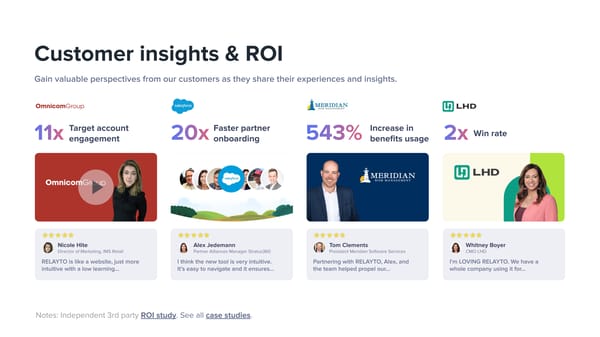
## Customer insights & ROI Gain valuable perspectives from our customers as they share their experiences and insights. **OmnicomGroup** **11x** Target account engagement Salesforce logo Salesforce logo **20x** Faster partner onboarding Meridian Risk Management logo Meridian Risk Management logo **543%** Increase in benefits usage LHD logo LHD logo **2x** Win rate OmnicomGroup testimonial card featuring a video play button and a woman's portrait. OmnicomGroup testimonial card featuring a video play button and a woman's portrait. 5 yellow stars rating 5 yellow stars rating Nicole Hite profile picture Nicole Hite profile picture **Nicole Hite** Director of Marketing, IMS Retail RELAYTO is like a website, just more intuitive with a low learning... Salesforce testimonial card featuring a group of people and a landscape background. Salesforce testimonial card featuring a group of people and a landscape background. 5 yellow stars rating 5 yellow stars rating Alex Jedemann profile picture Alex Jedemann profile picture **Alex Jedemann** Partner Alliances Manager Stratus360 I think the new tool is very intuitive. It's easy to navigate and it ensures... Meridian Risk Management testimonial card featuring a man's portrait and the company logo. Meridian Risk Management testimonial card featuring a man's portrait and the company logo. 5 yellow stars rating 5 yellow stars rating Tom Clements profile picture Tom Clements profile picture **Tom Clements** President Meridian Software Services Partnering with RELAYTO, Alex, and the team helped propel our... LHD testimonial card featuring a woman's portrait and the company logo. LHD testimonial card featuring a woman's portrait and the company logo. 5 yellow stars rating 5 yellow stars rating Whitney Boyer profile picture Whitney Boyer profile picture **Whitney Boyer** CMO LHD I'm LOVING RELAYTO. We have a whole company using it for... Notes: Independent 3rd party ROI study. See all case studies.
A blurry screenshot of a mobile application interface. At the top, there is a dark navigation bar. Below it, the screen is divided into three columns. The left column contains two red circular icons with white outlines. The middle column contains a red circular icon with a white outline at the top, followed by several lines of grey text. The right column contains a red circular icon with a white outline at the top, followed by several lines of grey text. The background is light grey. A blurry screenshot of a mobile application interface. At the top, there is a dark navigation bar. Below it, the screen is divided into three columns. The left column contains two red circular icons with white outlines. The middle column contains a red circular icon with a white outline at the top, followed by several lines of grey text. The right column contains a red circular icon with a white outline at the top, followed by several lines of grey text. The background is light grey. A dark blue rectangular background featuring a repeating pattern of the University of Wisconsin-Madison shield logo in white and orange. The logo consists of a shield with a red horizontal stripe across the middle, flanked by white sections, with a red 'W' on the left and a red 'U' on the right. The entire image is framed by a thick black border. The image displays a dark blue background with a repeating pattern of the University of Wisconsin-Madison shield logo. The logo is arranged in two rows of six shields each. Each shield is white with a red horizontal stripe across the middle. On the left side of the stripe is a red 'W' and on the right side is a red 'U'. The entire image is enclosed in a thick black border. A dark blue rectangular background featuring a repeating pattern of the University of Wisconsin-Madison shield logo in white and orange. The logo consists of a shield with a red horizontal stripe across the middle, flanked by white sections, with a red 'W' on the left and a red 'U' on the right. The entire image is framed by a thick black border.
## Join us Digital winners deploy RELAYTO to transform conventional content into WOW outcomes, AT SCALE. Let's win together. Start free trialPricingLet's meet