

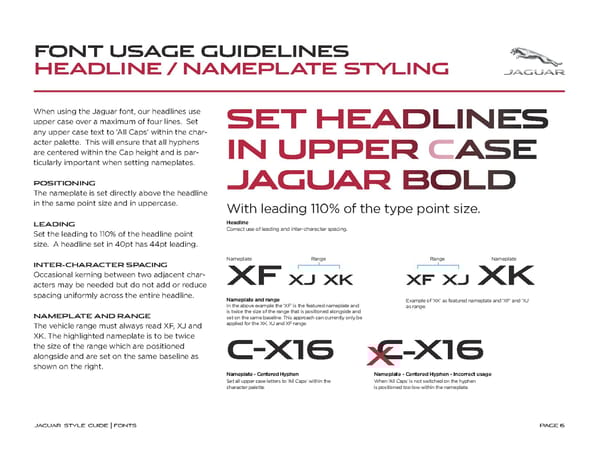
PAG E 6 When using the Jaguar font, our headlines use upper case over a maximum of four lines. Set any upper case text to ‘All Caps’ within the char - acter palette. This will ensure that all hyphens are centered within the Cap height and is par - ticularly important when setting nameplates. POSITIONING The nameplate is set directly above the headline in the same point size and in uppercase. LEADING Set the leading to 110% of the headline point size. A headline set in 40pt has 44pt leading. INTER-CHARACTER SPACING Occasional kerning between two adjacent char - acters may be needed but do not add or reduce spacing uniformly across the entire headline. NAMEPLATE AND RANGE The vehicle range must always read XF, XJ and XK. The highlighted nameplate is to be twice the size of the range which are positioned alongside and are set on the same baseline as shown on the right. FONT USAGE GUIDELINES HEADLINE / NAMEPLATE STYLING J AG U A R STYL E G UID E | FONTS With leading 110% of the type point size. Nameplate Range Range Nameplate XF XJ XK C ! X16 C ! X16 X XF XJ XK Nameplate and range Headline Correct use of leading and inter-character spacing. In the above example the ‘XF’ is the featured nameplate and is twice the size of the range that is positioned alongside and set on the same baseline. This approach can currently only be applied for the XK, XJ and XF range. Example of ‘XK’ as featured nameplate and ‘XF’ and ‘XJ’ as range. Set all upper case letters to ‘All Caps’ within the character palette. When ‘All Caps’ is not switched on the hyphen is positioned too low within the nameplate. Nameplate - Centered Hyphen Nameplate - Centered Hyphen - Incorrect usage SET HEADLINES IN UPPER CASE JAGUAR BOLD
 Jaguar Brand Book Page 5 Page 7