

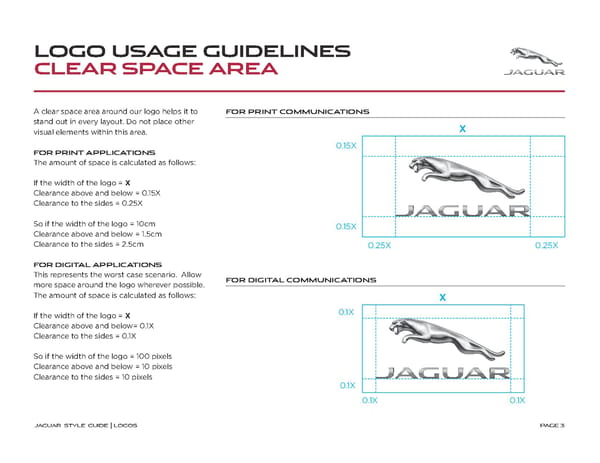
PAG E 3 A clear space area around our logo helps it to stand out in every layout. Do not place other visual elements within this area. FOR PRINT APPLICATIONS The amount of space is calculated as follows: If the width of the logo = X Clearance above and below = 0.15X Clearance to the sides = 0.25X So if the width of the logo = 10cm Clearance above and below = 1.5cm Clearance to the sides = 2.5cm FOR DIGITAL APPLICATIONS This represents the worst case scenario. Allow more space around the logo wherever possible. The amount of space is calculated as follows: If the width of the logo = X Clearance above and below= 0.1X Clearance to the sides = 0.1X So if the width of the logo = 100 pixels Clearance above and below = 10 pixels Clearance to the sides = 10 pixels LOGO USAGE GUIDELINES CLEAR SPACE AREA J AG U A R STYL E G UID E | LO G OS FOR PRINT COMMUNICATIONS FOR DIGITAL COMMUNICATIONS 0.15X 0.15X 0.25X 0.25X X 0.1X 0.1X 0.1X 0.1X X
 Jaguar Brand Book Page 2 Page 4