

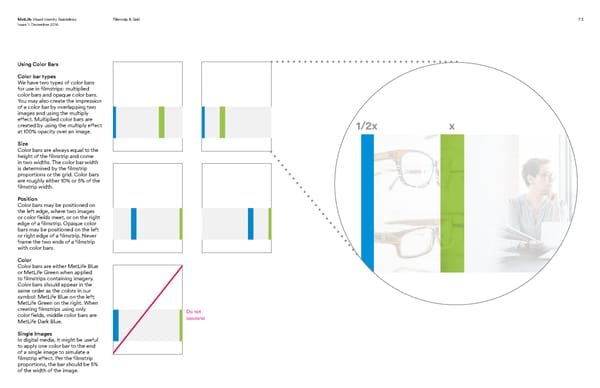
Keeping your MetLife Visual Identity Guidelines Filmstrip & Grid 7.3 Issue 1: December 2016 life in focus. Using Color Bars Color bar types We have two types of color bars for use in filmstrips: multiplied color bars and opaque color bars. You may also create the impression of a color bar by overlapping two images and using the multiply effect. Multiplied color bars are created by using the multiply effect 1/2x x at 100% opacity over an image. Size Color bars are always equal to the height of the filmstrip and come in two widths. The color bar width is determined by the filmstrip proportions or the grid. Color bars are roughly either 10% or 5% of the filmstrip width. Position Color bars may be positioned on the left edge, where two images or color fields meet, or on the right edge of a filmstrip. Opaque color bars may be positioned on the left or right edge of a filmstrip. Never frame the two ends of a filmstrip with color bars. Color Color bars are either MetLife Blue or MetLife Green when applied to filmstrips containing imagery. Color bars should appear in the same order as the colors in our symbol: MetLife Blue on the left; MetLife Green on the right. When creating filmstrips using only Do not color fields, middle color bars are bookend MetLife Dark Blue. Single Images In digital media, it might be useful to apply one color bar to the end of a single image to simulate a filmstrip effect. Per the filmstrip proportions, the bar should be 5% of the width of the image.
 MetLife Brand Book Page 50 Page 52