

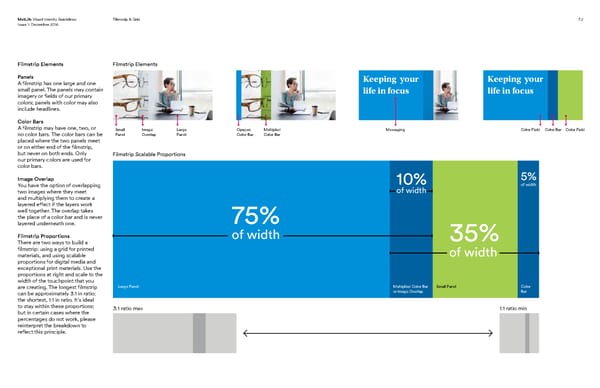
MetLife Visual Identity Guidelines Filmstrip & Grid 7.2 Issue 1: December 2016 Filmstrip Elements Filmstrip Elements Panels Keeping your Keeping your A filmstrip has one large and one small panel. The panels may contain life in focus life in focus imagery or fields of our primary colors; panels with color may also include headlines. Color Bars A filmstrip may have one, two, or Small Image Large Opaque Multipled Messaging Color Field Color Bar Color Field no color bars. The color bars can be Panel Overlap Panel Color Bar Color Bar placed where the two panels meet or on either end of the filmstrip, but never on both ends. Only Filmstrip Scalable Proportions our primary colors are used for color bars. Image Overlap 10% 5% You have the option of overlapping of width of width two images where they meet and multiplying them to create a layered effect if the layers work well together. The overlap takes the place of a color bar and is never 75% layered underneath one. Filmstrip Proportions of width 35% There are two ways to build a filmstrip: using a grid for printed of width materials, and using scalable proportions for digital media and exceptional print materials. Use the proportions at right and scale to the width of the touchpoint that you are creating. The longest filmstrip Large Panel Multiplied Color Bar Small Panel Color can be approximately 3:1 in ratio; or Image Overlap Bar the shortest, 1:1 in ratio. It’s ideal to stay within these proportions; 3:1 ratio max 1:1 ratio min but in certain cases where the percentages do not work, please reinterpret the breakdown to reflect this principle.
 MetLife Brand Book Page 49 Page 51