

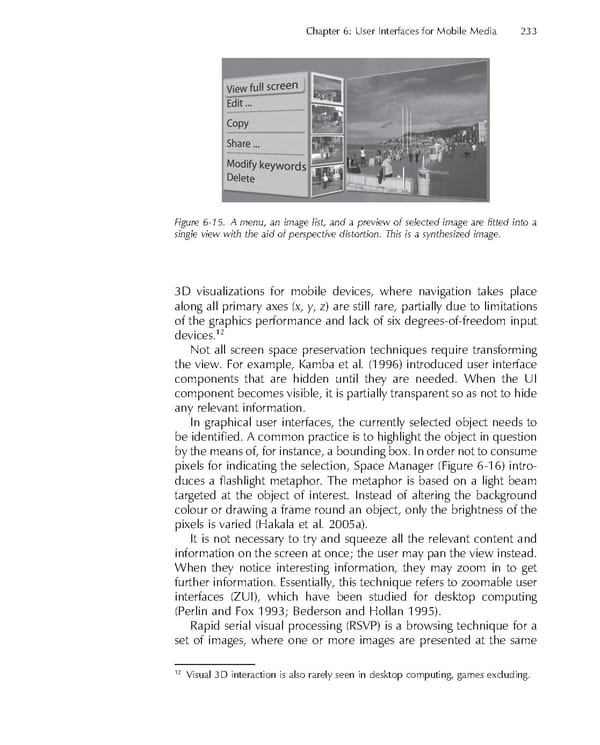
Chapter 6: User Interfaces for Mobile Media 233 Figure 6-15. A menu, an image list, and a preview of selected image are fi tted into a single view with the aid of perspective distortion. This is a synthesized image. 3D visualizations for mobile devices, where navigation takes place along all primary axes (x, y, z) are still rare, partially due to limitations of the graphics performance and lack of six degrees-of-freedom input devices.12 Not all screen space preservation techniques require transforming the view. For example, Kamba et al. (1996) introduced user interface components that are hidden until they are needed. When the UI component becomes visible, it is partially transparent so as not to hide any relevant information. In graphical user interfaces, the currently selected object needs to be identifi ed. A common practice is to highlight the object in question by the means of, for instance, a bounding box. In order not to consume pixels for indicating the selection, Space Manager (Figure 6-16) intro- duces a fl ashlight metaphor. The metaphor is based on a light beam targeted at the object of interest. Instead of altering the background colour or drawing a frame round an object, only the brightness of the pixels is varied (Hakala et al. 2005a). It is not necessary to try and squeeze all the relevant content and information on the screen at once; the user may pan the view instead. When they notice interesting information, they may zoom in to get further information. Essentially, this technique refers to zoomable user interfaces (ZUI), which have been studied for desktop computing (Perlin and Fox 1993; Bederson and Hollan 1995). Rapid serial visual processing (RSVP) is a browsing technique for a set of images, where one or more images are presented at the same 12 Visual 3D interaction is also rarely seen in desktop computing, games excluding.
 Personal Content Experience Page 256 Page 258