

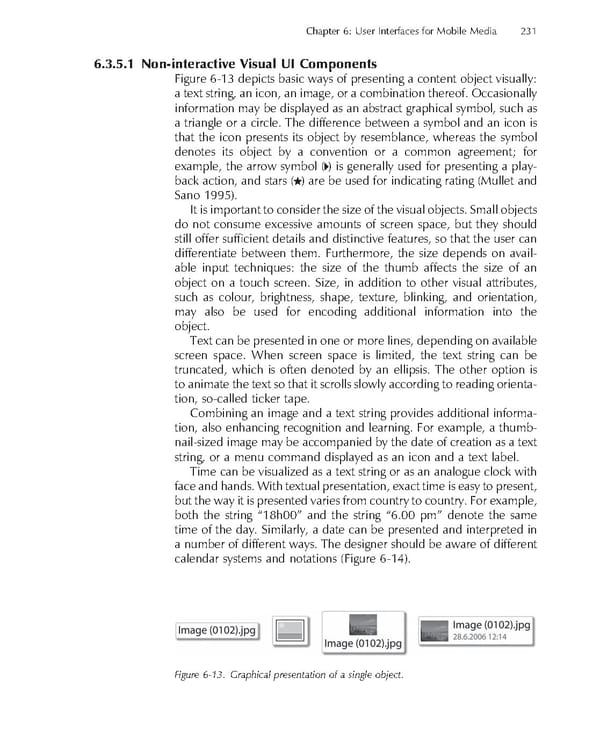
Chapter 6: User Interfaces for Mobile Media 231 6.3.5.1 Non-interactive Visual UI Components Figure 6-13 depicts basic ways of presenting a content object visually: a text string, an icon, an image, or a combination thereof. Occasionally information may be displayed as an abstract graphical symbol, such as a triangle or a circle. The difference between a symbol and an icon is that the icon presents its object by resemblance, whereas the symbol denotes its object by a convention or a common agreement; for example, the arrow symbol ( ) is generally used for presenting a play- back action, and stars ( ) are be used for indicating rating (Mullet and Sano 1995). It is important to consider the size of the visual objects. Small objects do not consume excessive amounts of screen space, but they should still offer suffi cient details and distinctive features, so that the user can differentiate between them. Furthermore, the size depends on avail- able input techniques: the size of the thumb affects the size of an object on a touch screen. Size, in addition to other visual attributes, such as colour, brightness, shape, texture, blinking, and orientation, may also be used for encoding additional information into the object. Text can be presented in one or more lines, depending on available screen space. When screen space is limited, the text string can be truncated, which is often denoted by an ellipsis. The other option is to animate the text so that it scrolls slowly according to reading orienta- tion, so-called ticker tape. Combining an image and a text string provides additional informa- tion, also enhancing recognition and learning. For example, a thumb- nail-sized image may be accompanied by the date of creation as a text string, or a menu command displayed as an icon and a text label. Time can be visualized as a text string or as an analogue clock with face and hands. With textual presentation, exact time is easy to present, but the way it is presented varies from country to country. For example, both the string “18h00” and the string “6.00 pm” denote the same time of the day. Similarly, a date can be presented and interpreted in a number of different ways. The designer should be aware of different calendar systems and notations (Figure 6-14). Figure 6-13. Graphical presentation of a single object.
 Personal Content Experience Page 254 Page 256