

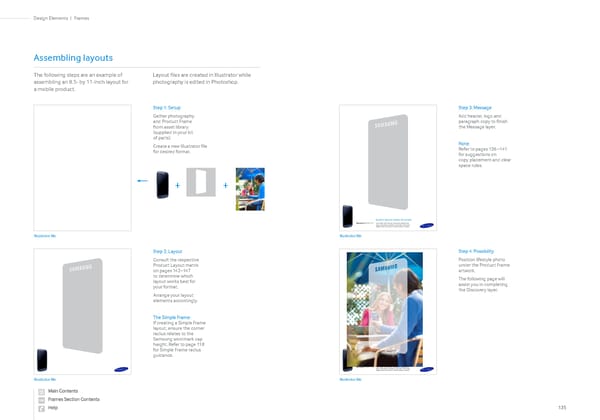
Step 1: Setup Gather photography and Product Frame from asset library (supplied in your kit of parts). Create a new Illustrator file for desired format. Step 2: Layout Consult the respective Product Layout matrix on pages 142–147 to determine which layout works best for your format. Arrange your layout elements accordingly. The Simple Frame: If creating a Simple Frame layout, ensure the corner radius relates to the Samsung wordmark cap height. Refer to page 118 for Simple Frame radius guidance. Step 3: Message Add header, logo and paragraph copy to finish the Message layer. Note: Refer to pages 136 –141 for suggestions on copy placement and clear space rules. Step 4: Possibility Position lifestyle photo under the Product Frame artwork. The following page will assist you in completing the Discovery layer. Assembling layouts The following steps are an example of assembling an 8.5- by 11-inch layout for a mobile product. Layout files are created in Illustrator while photography is edited in Photoshop. + + Illustrator file Illustrator file Illustrator file Illustrator file Lorem ipsum dolor sit amet. Lorem ipsum dolor sit amet, consectetur adipiscing elit. Erat ac nulla semper molestie nec sed justo. Proin cursus dapibus metus nec tempor. Donenulla semper molestie. Samsung GALAXY S 3 Lorem ipsum dolor sit amet. Lorem ipsum dolor sit amet, consectetur adipiscing elit. Erat ac nulla semper molestie nec sed justo. Proin cursus dapibus metus nec tempor. Donenulla semper molestie. Samsung GALAXY S 3 135 Frames | Design Elements
 Samsung Brand Book Page 66 Page 68