
AI-ready microsites and PDFs, with nothing to set up
RELAYTO makes your microsites and PDFs AI-agent friendly: a clean Markdown copy of every page and document, plus llms.txt, an MCP server and WebMCP tools, kept current as you publish.
Rated by independent audits
- ora.ai
- Grade AAgent-Ready
- is-agentic.com
- 98/100Strong technical baseline
- Cloudflare
- Agent-IntegratedAgent Readiness Scanner
For people
For AI agents
---title: "Calder Group Annual Report"description: "Annual report and accounts for the financial year"canonical: "https://investors.yourcompany.com/e/calder-group-annual-report-b2n6x4kr8tf9e"--- # Calder Group Annual Report > Annual report and accounts for the financial year - Interactive version: https://investors.yourcompany.com/e/calder-group-annual-report-b2n6x4kr8tf9e- Format: PDF document, 10 pages- Published by: [Calder Group](https://investors.yourcompany.com/)- More from this site: https://investors.yourcompany.com/llms.txt ## Page 1 ### Energy for a lower-carbon decade Calder Group plc · Annual Report and AccountsUsed by listed companies with a $2 trillion combined market cap.




Every PDF and page, in clean Markdown
RELAYTO writes a Markdown copy of every public page, hub and PDF: plain, structured text that AI reads directly. PDFs come page by page, their tables as real Markdown tables.
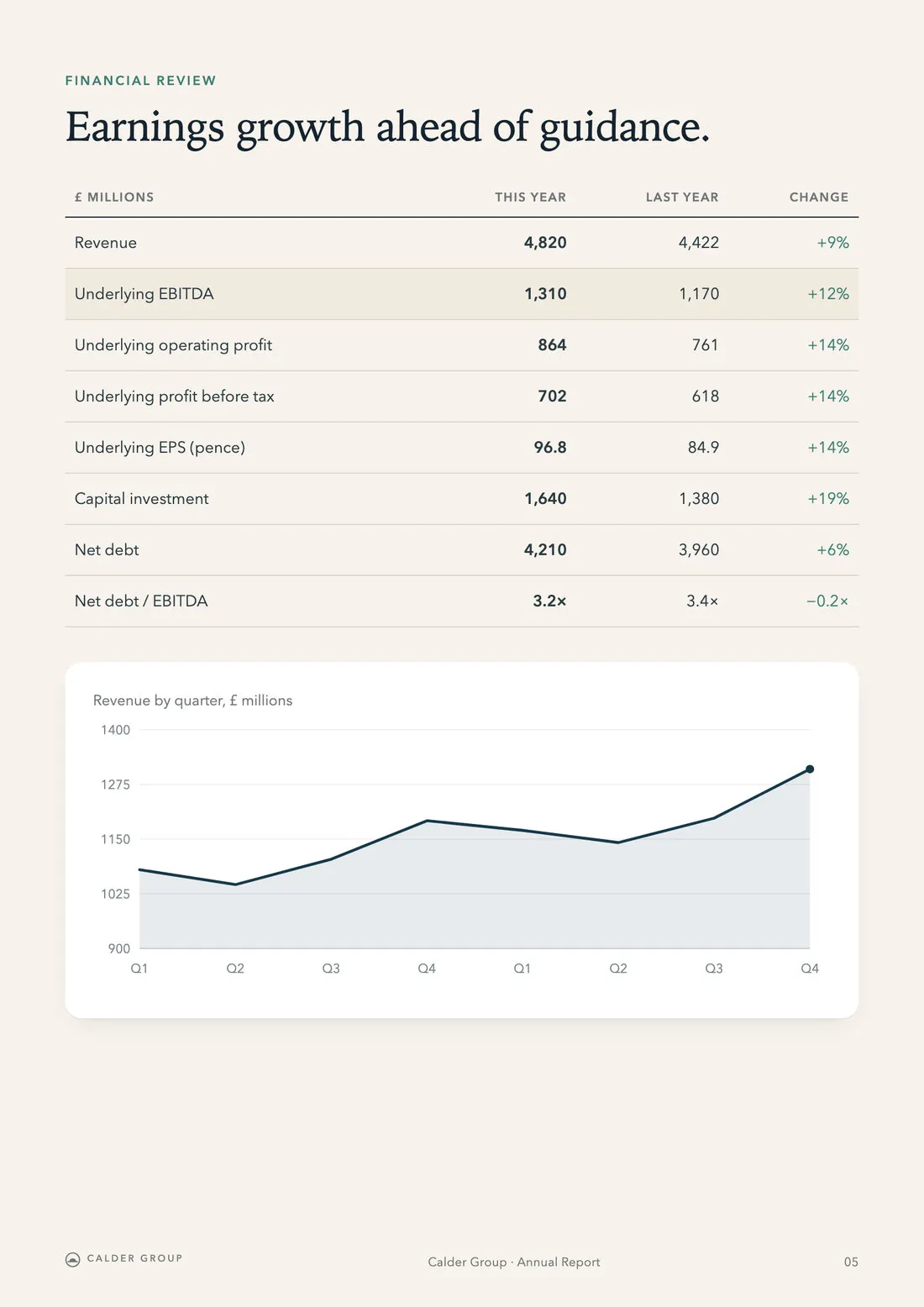
… ## Page 5 ### Earnings growth ahead of guidance. | £ millions | This year | Last year | Change || --- | --- | --- | --- || Revenue | 4,820 | 4,422 | +9% || Underlying EBITDA | 1,310 | 1,170 | +12% || Underlying operating profit | 864 | 761 | +14% || Underlying profit before tax | 702 | 618 | +14% || Underlying EPS (pence) | 96.8 | 84.9 | +14% || Capital investment | 1,640 | 1,380 | +19% || Net debt | 4,210 | 3,960 | +6% || Net debt / EBITDA | 3.2× | 3.4× | −0.2× | Revenue by quarter in £ millions over the last eight quarters, drawn as a line that ends at its highest point. ## Page 6 ### More capacity, better availability. Operating capacity reached 6.4 GW after 1.1 GW of new projects came online. Fleet availability was 97.1%, and wind load factors recovered after a weak prior year.…- Results
- Reports
- Share information
- ESG

Share information
Share price, dividends and results at a glance.
Results at a glance
| Measure | This year | Last year | Change |
|---|---|---|---|
| Revenue (£m) | 4,820 | 4,422 | +9% |
| Underlying EBITDA (£m) | 1,310 | 1,170 | +12% |
| Underlying EPS (p) | 96.8 | 84.9 | +14% |
| Dividend per share (p) | 41.6 | 38.5 | +8% |
… [Image: The Northfield grid link at dusk] ## Results at a glance | Measure | This year | Last year | Change || --- | --- | --- | --- || Revenue (£m) | 4,820 | 4,422 | +9% || Underlying EBITDA (£m) | 1,310 | 1,170 | +12% || Underlying EPS (p) | 96.8 | 84.9 | +14% || Dividend per share (p) | 41.6 | 38.5 | +8% | ### Dividend policy …About 8×
smaller than the page an AI crawler would otherwise read (7.5× to 9.2× on three RELAYTO pages), so an AI takes in more of each document at once.
Every page, hub and PDF
Microsites, hubs and documents, each at its address plus .md.
Page numbers to cite
Each PDF page under its own heading, so an answer can name it.
Web pages keep their tables
Headings, lists, tables and each image’s alt text, as on the page.
Layout-aware PDF parsing
Marker, a layout-aware PDF parser, turns tables into Markdown tables and describes images.
Agents can search your site and quote it
Claude, ChatGPT and other AI tools can search your investor documents, read the document they need and quote it with a link back. Reading your site needs no sign-in.
What was Calder Group’s underlying EBITDA last year?
Used search_contentinvestors.yourcompany.com/mcp
{"query":"annual report","limit":3}Calder Group Annual Report · PDF document, 10 pages
Used get_content
{"url":"/e/calder-group-annual-report-b2n6x4kr8tf9e"} ## Page 5 · | Underlying EBITDA | 1,310 | 1,170 | +12% |
Underlying EBITDA was £1,310m, up 12% from £1,170m the year before.1
Calder Group Annual Report, page 5
investors.yourcompany.com/e/calder-group-annual-report-b2n6x4kr8tf9e
- MCP server
/mcp - AI tools connect to your site, search it and read any page.
- MCP Registry
com.relayto/site-content - One official MCP Registry entry covers your site’s server, at your address.
- WebMCP
workspace-tools-v2.js - Agents working in a browser use your site’s own search.
- Agent Skills
/.well-known/agent-skills - A ready instruction card: how to find, read and cite you.
- Site API and OpenAPI
/api/site/v1 - Your published content as data, with no API key.
- NLWeb
/ask - A question in plain words returns the matching pages.
- CLI and SDK
npx relayto - Developers search your site from a terminal or their code.
Found by AI search, and understood
Each site publishes the files AI crawlers and agents look for first, and gives crawlers that cannot run scripts the finished page.
# Calder Group Investor Relations > Results, reports, presentations and governance documents for investors in Calder Group (CALD). … ## Tools for AI agents - [Content server (MCP)](https://investors.yourcompany.com/mcp/server-card): public and read-only, no sign-in, …- [Authentication for agents](https://investors.yourcompany.com/auth.md): reading this site needs no credentials.- [Agent skill](https://investors.yourcompany.com/.well-known/agent-skills/index.json): how to find, read and cite this site.… ## Hubs - [Calder Group Investor Centre](https://investors.yourcompany.com/hub/calder-group-investor-centre-6af31c2d9e8b4.md): …- [Results & Presentations](https://investors.yourcompany.com/hub/results-presentations-6af31b8e4c7d1.md): …… ## Content - [Calder Group Annual Report](https://investors.yourcompany.com/e/calder-group-annual-report-b2n6x4kr8tf9e.md): ……llms.txt
A guide for AI: who you are, every hub and document, the tools.
Markdown at the same address
Ask any page for text and it answers in Markdown.
Full pages for crawlers
Search and AI crawlers get each page fully rendered, text included.
Catalogues and structured data
Standard files listing every page, what each one is, and your AI tools.
Search and answers on, training off by default
Your site lets AI companies use your content for search and answers. Model training is off by default, and you decide whether to switch it on. Agents see only what an anonymous visitor could open.
User-agent: *Content-Signal: search=yes, ai-input=yes, ai-train=noDisallow: /cdn/*Disallow: /api/*Allow: /api/site/ # AI search, and AI assistants fetching a page for a userUser-agent: OAI-SearchBotUser-agent: ChatGPT-UserUser-agent: Claude-SearchBotUser-agent: Claude-UserUser-agent: PerplexityBot…Content-Signal: search=yes, ai-input=yes, ai-train=no… Sitemap: https://investors.yourcompany.com/sitemap.xmlWhat your site tells AI companies
- Search
- Yes
- AI answers
- Yes
- Model training
- Off by default
Content Signals
One robots.txt line tells every crawler: search yes, AI answers yes, training off.
Training off by default
Model training stays off unless you switch it on for your site.
Rights reserved
A machine-readable notice, made for EU copyright rules, reserves text and data mining.
Closed pages stay closed
Private, password, sign-in and gated pages stay closed to agents.
What AI reads changes when you publish
Publish, update or take down a document, and its Markdown, llms.txt, sitemap and search follow within minutes. New standards reach every workspace as RELAYTO adds them.

Published
Calder Group Annual Report
Live for agents
RELAYTO AI
calder-group-annual-report-b2n6x4kr8tf9e.mdMarkdown copyllms.txtListedsitemap.xmlListed/mcpIn agent search/api/site/v1In the site API/schema-feed.jsonlIn the schema.org catalogue
Publish
A new report is listed and searchable by agents.
Update
Replace the PDF and its text is read again.
Take down
Unpublished or private content leaves every file and the search.
New standards
RELAYTO adds them to every workspace at once.
Four layers RELAYTO adds to every site
People see your investor site as it is. Under it, every public workspace site gets four layers that AI search and agents use, all on by default.
Readable
Every page and PDF as clean text an AI can read and cite.
<page>.mdAccept: text/markdown## Page NMarkerPrerender
Findable
A map of everything you publish, in the files AI search looks for.
llms.txtsitemap.xmlschema.org feedLink headersARDRFC 9727 api-catalog
Usable by agents
Tools that let AI search your site, read it and quote it.
MCP serverMCP RegistryWebMCPAgent SkillsOpenAPI 3.1NLWeb /ask
Your rules
Search and AI answers allowed, model training off, closed pages closed.
robots.txtContent SignalsTDMRepauth.md
All four follow what you publish, within minutes. max-age=300
Common questions
Set-up, training, domains, privacy and PDFs.
Do we need to do anything?
No. Every public RELAYTO workspace site gets all of this, on a relayto.com subdomain or your own domain. There is nothing to install, switch on or maintain. Publish as you do today, and the Markdown copies, llms.txt, sitemap and agent tools follow each change on their own.
Will AI companies train on our content?
Not unless you want them to. Training is off by default: your site’s robots.txt allows search and AI answers and refuses model training, and a TDMRep file reserves text and data mining rights. If you want your content used to train AI models, you can switch training on for your site. Crawlers that follow these standards respect your choice; no website can force one that ignores them.
Does this work on our own domain?
Yes. A site on your own domain, such as investors.yourcompany.com, gets the same Markdown copies, llms.txt, crawler rules and agent tools as one on a relayto.com subdomain, all at your own address. A customer’s investor relations site on its own domain runs these agent features today.
What about private documents?
Agents see only what an anonymous visitor could open. Private, password-protected, sign-in and email-gated pages stay closed, and a page behind a disclaimer is not reproduced. Unlisted pages stay out of llms.txt, the sitemap and agent search; anyone with the link can still read them. One privacy rule covers the Markdown copies, the MCP server, WebMCP and the API.
Which AI tools does this work with?
Assistants that open a page for a user, such as ChatGPT, Claude, Perplexity and Mistral, get the Markdown copy automatically, and any tool can ask for it. Claude, ChatGPT and other AI tools that support MCP can connect to your site and search it, and agents working in a browser can use its WebMCP tools.
How well does AI read our PDFs?
Every PDF is readable page by page, so an assistant can say which page a figure came from. RELAYTO parses it with Marker, a layout-aware PDF parser, which turns tables into real Markdown tables and describes images in words.
How is this different from adding llms.txt ourselves?
An llms.txt you write is one file, out of date at your next publish. RELAYTO writes yours from what is published, with a Markdown copy of every page and PDF behind each link, and adds the MCP server, crawler rules and discovery files agent-readiness audits check. All of it follows your content.
See a site the way AI agents do
We’ll open a live RELAYTO site and show you what ChatGPT, Claude and other agents read from it.