
See who read your documents, page by page
RELAYTO’s document analytics shows the pages each reader opened in a PDF or deck, and for how long. Readers who enter an email or open their own link are named.
Omnicom Group saw an 1100% increase in target account engagement with RELAYTO.




Know the moment they open your proposal
Send each person their own tracking link. The first time they open it, you get an email saying when, where and on what device, with a link to what they read.
ShareProposal for Meridian Foods
SharePeopleTracking linksAccess control
- DWDana WhitfieldVP OperationsOpened today, 08:42
- SOSam OkaforFinance DirectorOpened yesterday
- PRPriya RamanIT SecuritySent 2 days ago
+ New tracking link
RRELAYTOto you08:42
Dana Whitfield opened Proposal for Meridian Foods
- When
- Today, 08:42
- Where
- Leeds, United Kingdom
- Device
- Chrome 141, macOS 15, desktop
One link per person
Named after the reader, with a personal message from you.
Named readers too
Readers who enter their email or accept an invitation set off an alert too.
Each teammate chooses
An email for each new reader, or a daily or weekly report.
“The best feature has been the ability to track when a prospect accessed our proposal and forwarded it on.”
 Tara HeptinstallHead of Marketing, THETA
See what they read before you call
Open a reader’s visit history: each visit in the order it happened, the documents they opened, every page they read and the time spent on it.
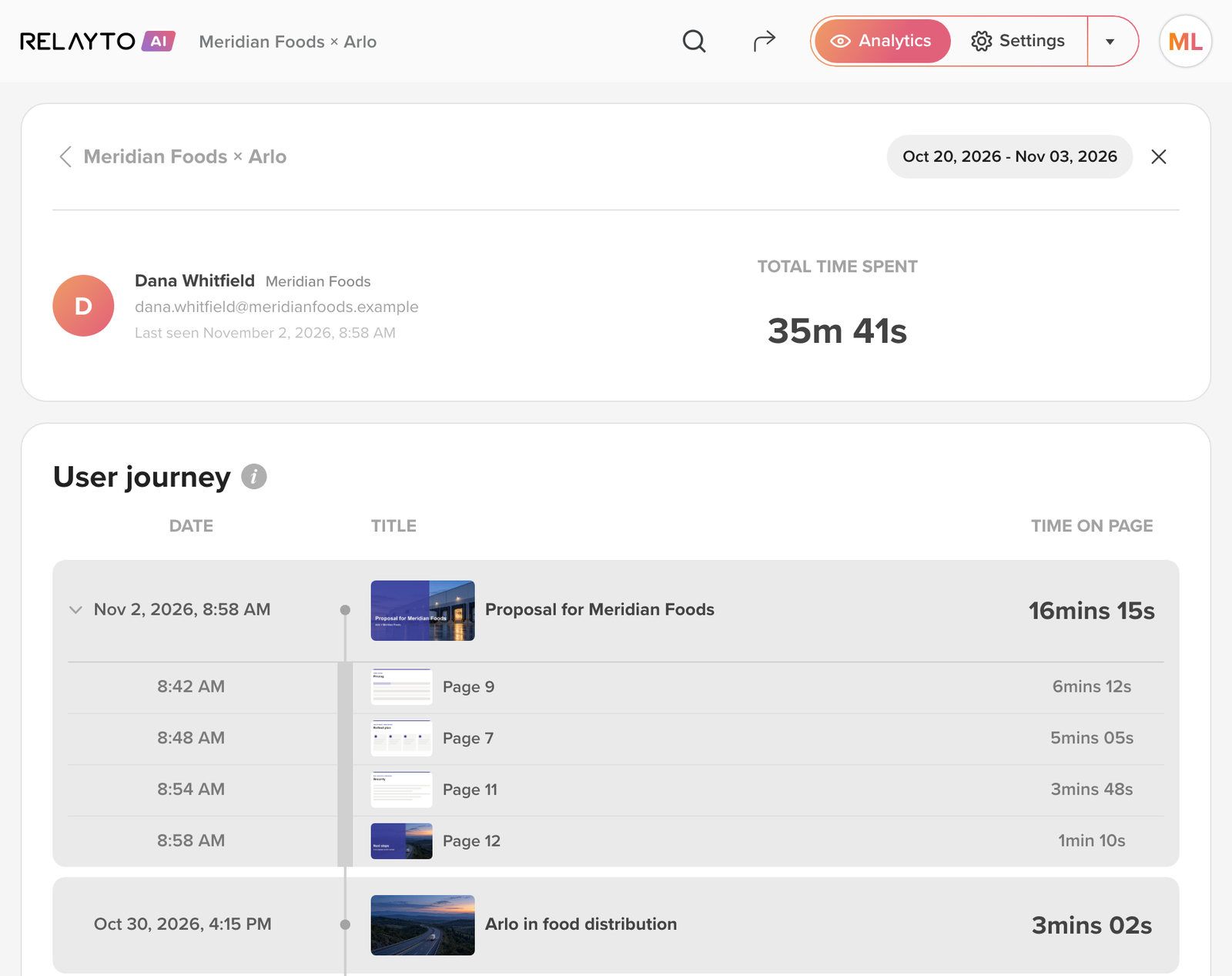
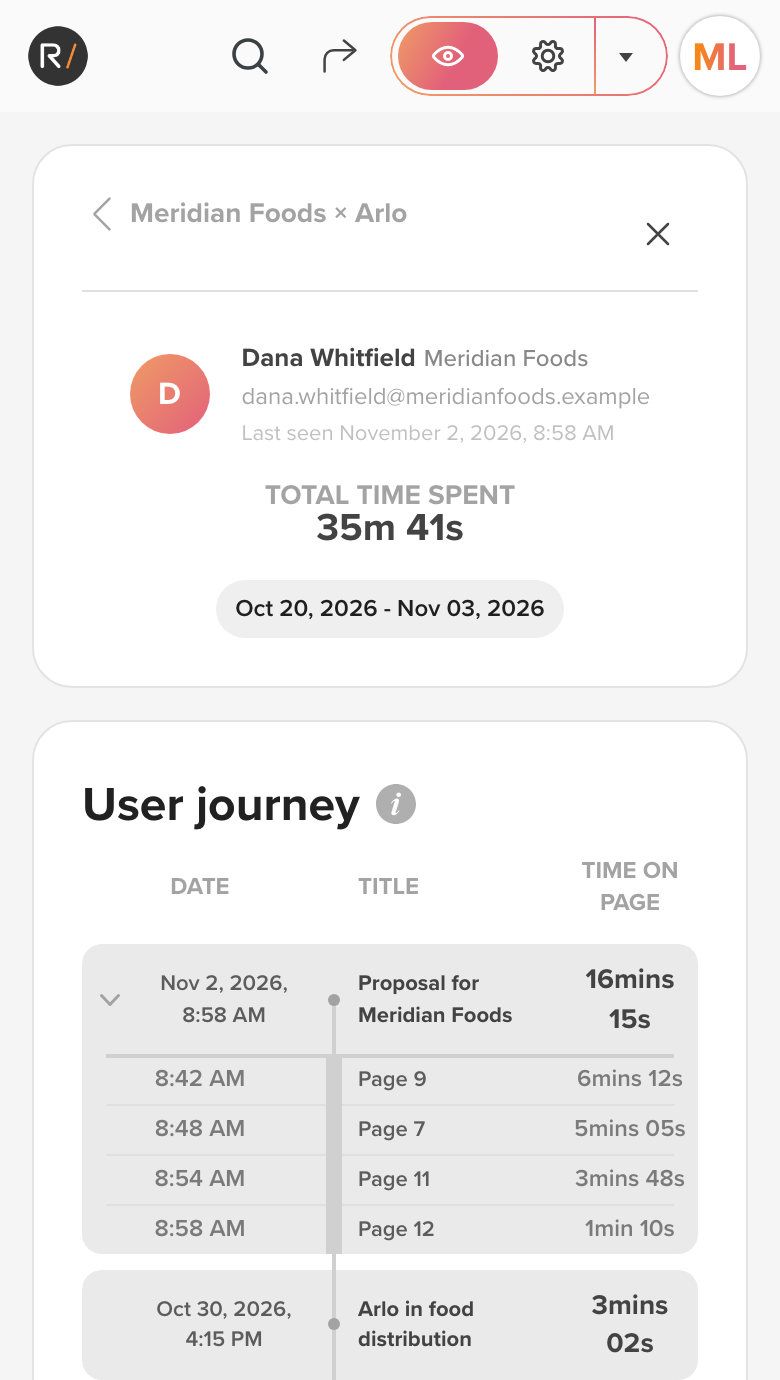
- The reader, their company and when they were last seen.
- Each visit, newest first, with what they opened and for how long.
- Inside a visit: every page they read, and the time on it.
Every document in one link, added up
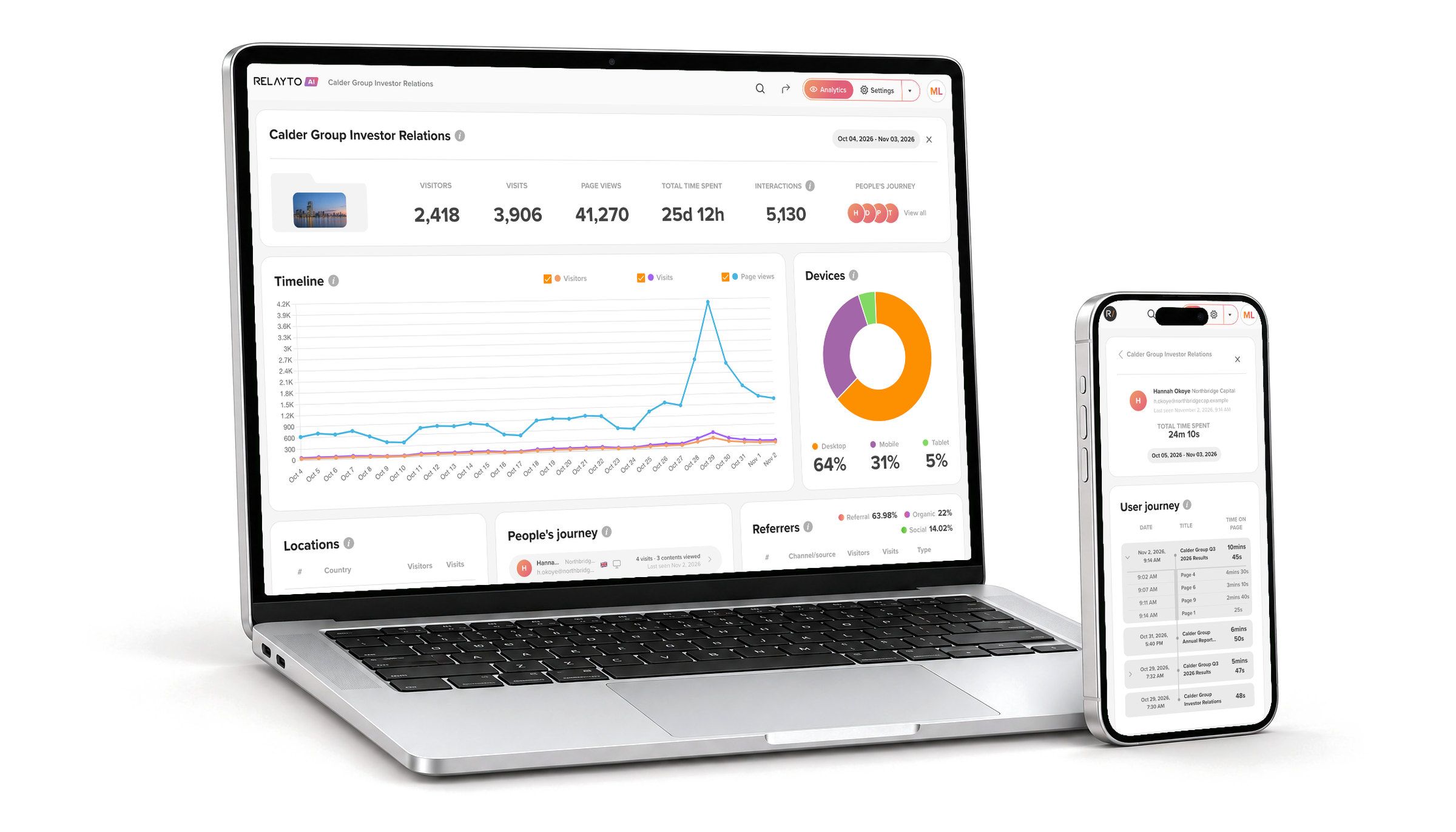
That link is a hub, such as an investor portal. Hub analytics adds them all up, with any hubs inside it, then breaks the total down by country, person, source and document.
How hubs work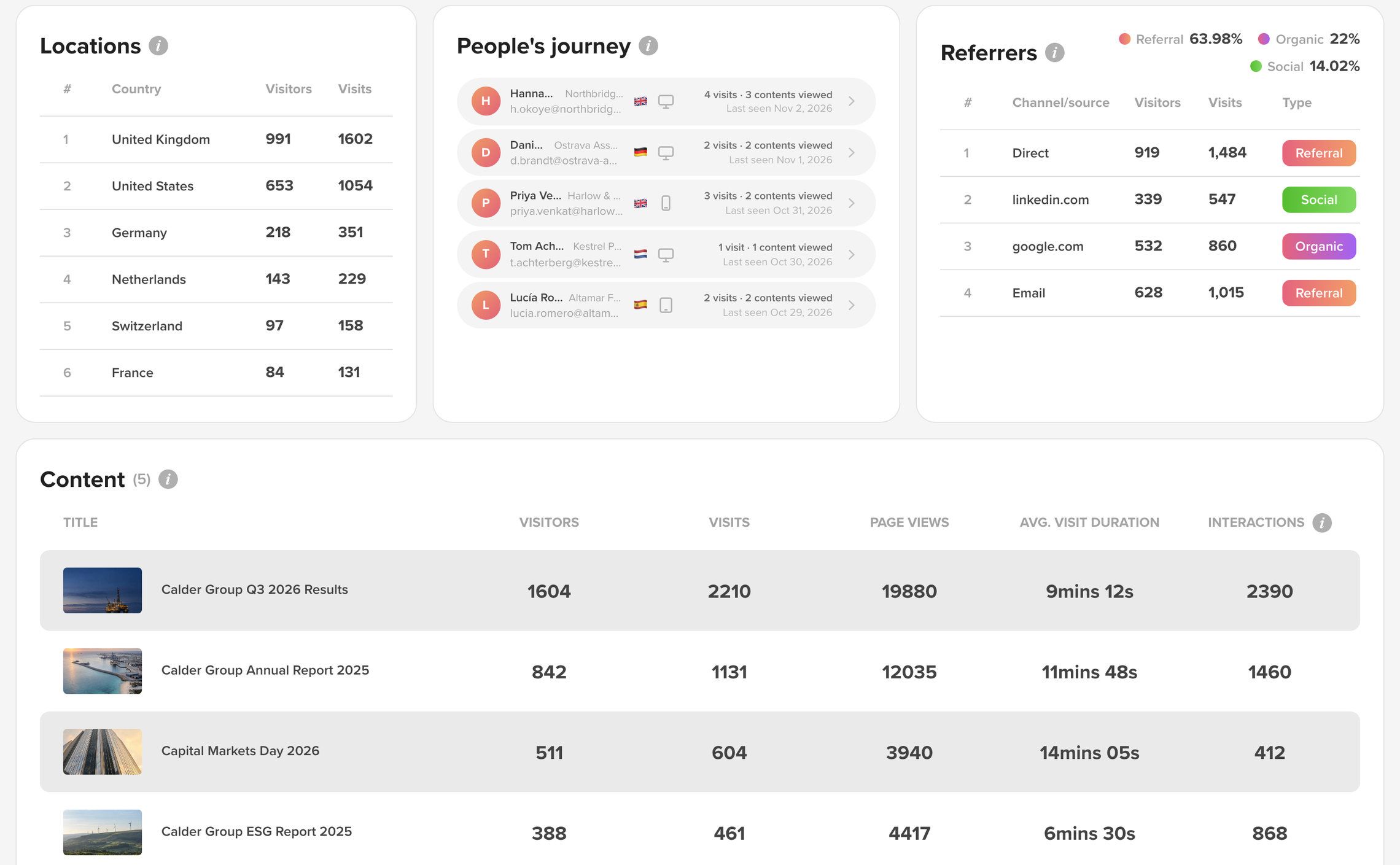
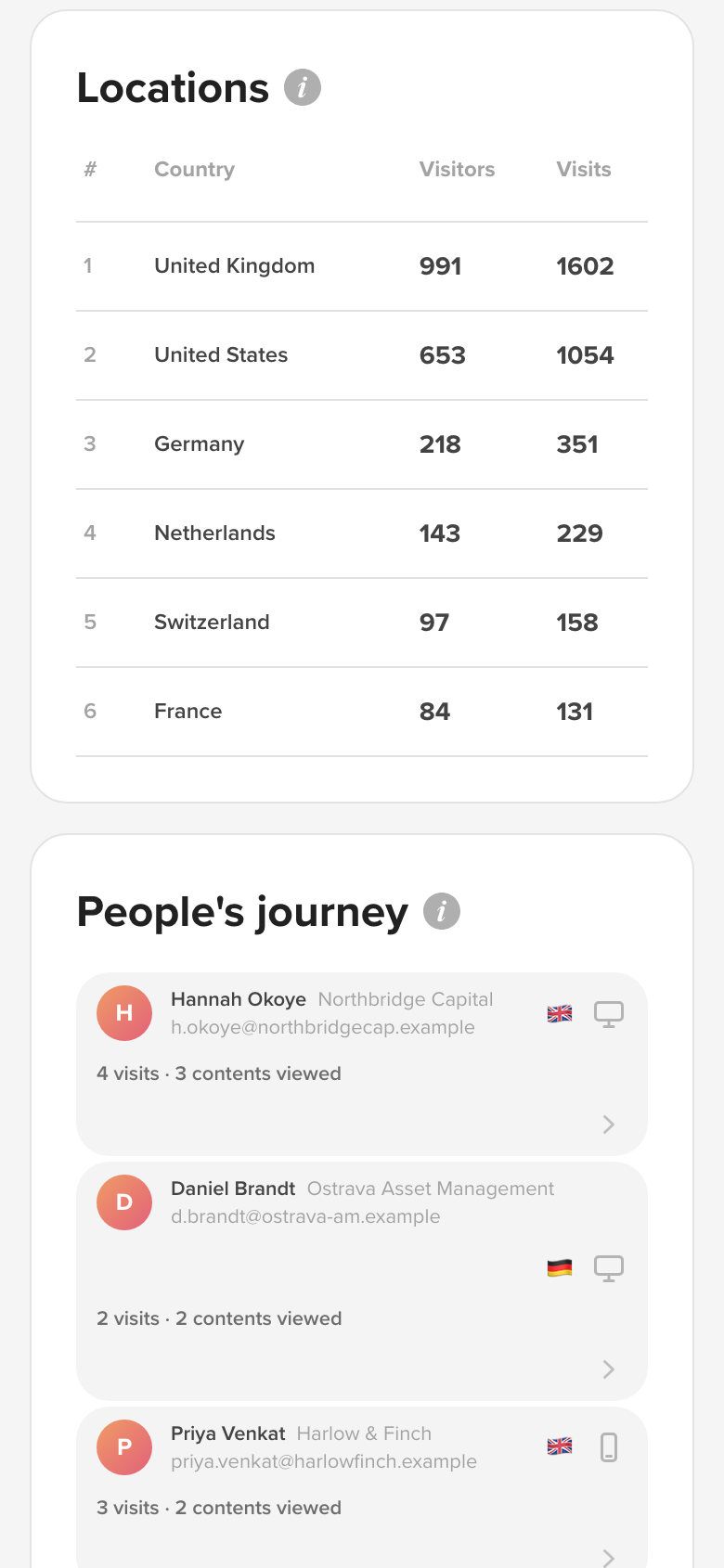
- Where readers are, by country.
- Who came: their company, country, device and visits.
- Where they came from: direct, email, search or social.
- Each document in the hub, side by side.
Everything in RELAYTO’s document analytics
- Benchmarks: page & period averages
- Each page against the document’s average, and each emailed report against the period before.
- Per-page & per-section metrics
- Views, readers, total time and clicks for every page of every document.
- People: visitor & account-level tracking
- Each named reader with their company; filter by email domain to see one account.
- Visit-level event timeline
- Each person’s visits by date: the documents opened and the time on every page.
- Geography, devices & referrers
- Country, city and language; device and browser; the site or email they came from.
- Downloads & interaction events
- Downloads, clicks on calls to action and popups opened, by page.
- Tracking links
- A named link per person, ticked as seen once they open it.
- CSV export & reporting
- People and charts to CSV; a daily or weekly report by email.
- Hub analytics
- One total for a hub and every hub inside it, then each document.
Reader data you can explain
RELAYTO names a reader only when they enter their email, accept an invitation or open a link you made for them.
SOC 2 Type 2, GDPR, HIPAA and CCPA, documented in the Trust Center.
How Content Security works- Emails kept out of links
- A link to a reader’s analytics carries a coded ID, never their email address.
- Everyone else, unnamed
- Anyone else shows as “Visitor”, with a country, a device and the pages read.
- Your own team left out
- Owners’, editors’ and analysts’ visits never count; a filter excludes everyone in your workspace.
- A role for the numbers
- “Can view analytics” lets a colleague see the numbers without the right to edit.
- Links that end
- Tracking links can expire on a date you set, or ask for a password.
- Data in your region
- Your workspace’s data is stored in the EU (Ireland) or the United States.
On from the first share
Nothing to install and no code to add to your website. Every document and hub records its visits from the moment you share it.
- Step 1
Share as you do now
Send the link wherever you would have sent the attachment.
- Step 2
Decide who is named
Ask for an email, send invitations, or make a link for each person.
- Step 3
Choose your alerts
Each teammate turns visit emails and reports on or off.
- Step 4
Act on what they read
Call the readers who reached pricing, and fix the pages they skip.
People and charts export as CSV for HubSpot, Salesforce or a spreadsheet, and any document or hub can be embedded on your own website. See every integration
Works with the rest of RELAYTO
- HubsDigital sales rooms and portalsPut a deal’s documents in one room and see the room’s total.
- Interactivity StudioMake your PDFs interactiveEvery button, form and popup you add is counted, by page.
- Content SecurityShare documents securelyIts email prompts and invitations are what name a reader.
- PDF to WebPDFs and decks as web pagesTurn a PDF attachment into a link that reports back.
Common questions
About PDFs and proposals, hub analytics, privacy, forwarded links, your CRM and Google Analytics.
Can I see who viewed my PDF?
Not as an attachment: once a PDF is sent, you cannot tell whether anyone opened it. Share it as a RELAYTO link and you get PDF analytics: every visit, the pages read, the time on each and what was clicked. Downloads are counted, but a downloaded copy is not tracked. A reader is named when they enter their email, accept an invitation or open a link made for them.
What is document analytics?
Document analytics shows how people read the documents you send as links: who opened them, when, which pages they read and for how long. Sales teams use it to time a follow-up, and investor relations teams to see which investors read the results. RELAYTO measures PDFs, decks, videos and whole hubs this way, with nothing to install.
What is hub analytics?
Hub analytics is RELAYTO’s view of a whole hub, one link to a set of documents such as a sales room or an investor portal. It adds up every document in the hub and the hubs inside it, and lists each person who came, with their company and what they opened. Content analytics covers one document: its readers, pages and clicks. Hub analytics comes with the Business and Enterprise plans.
How do I know when someone opens my proposal?
Send it as a tracking link, and RELAYTO emails you the first time they open it, with the time, their city and country, and their browser and device. Readers who enter their email or accept an invitation set off an email too. Charts and each person’s visits can take up to two hours to update, and you can also get a daily or weekly report.
Do readers know they are being tracked?
Only if you tell them, so say so in your privacy notice, as you would for email tracking. Anonymous readers are never named: they show as “Visitor”, with a country, a device and the pages they read. A reader is named only when they enter their email, accept an invitation or open a link made for them. RELAYTO is SOC 2 Type 2, GDPR, HIPAA and CCPA compliant.
What happens when someone forwards the link?
A tracking link records every visit under the name you gave it, so a forward shows as more visits, often from a new place or device. To know who the new reader is, add an email gate: whoever opens the link enters their email first and appears by name.
Does it work with our CRM?
Through CSV files: export the people who read a document, and its charts, at any time and import them into HubSpot, Salesforce or a spreadsheet. The email you get when a reader opens a tracking link names the document, the time, the place and the device, ready to log against the contact.
We already have Google Analytics. Why this?
Google Analytics tells you a page on your website was loaded. RELAYTO sees inside the document: which page of the proposal was read, for how long, by whom when they are known, and what they clicked. It also works where your website does not reach, such as a link in an email or a private hub.
See which page your next buyer opens first
Bring a proposal or an investor deck you are about to send. We will set it up with you and show you what its readers tell you.